ZBrushCentral

... obj import in max7 ...

nightmare continue …
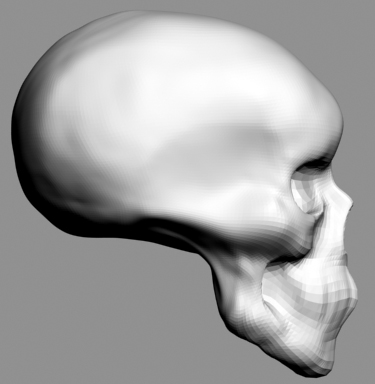
after freezing of max6 from .obj files of zbrush2 , max7 import .obj on facetes :frowning: :
how the hell you guys import smooth meshes from zbrush2 to max7 ?!

I use default max7 import procedure , because downloaded plug-ins are for older versions of max …
Is there some import/export plugins from zbrush2 to max7 ?

I try silo 1.3 to convert .obj to .3ds but result was the same - faceted trash mesh … :mad:

please help !

Attachments
11.jpg

hi popoff, i replied to your message at the bottom of my question post, but here it is again:

it just looks like you don’t have enough mesh resolution in your base mesh at the spots that are facetting. if you subdivide a few more times, those areas will smooth out…a more economical solution though, would probably be to add more resolution in your base mesh in max at the front of the skull and then export.

as far as exporting from zb2 to max7, i don’t do anything special, i just export the obj and import it in max…i usually only do it for subdiv level 1 meshes. i’ve only exported from zb2 to max7 at a higher subdiv level once ( and that was by accident ), but that worked just fine too.

… thanx for your answer and advices … I`ll try …

untick smoothing groups and put it on 1.

:small_orange_diamond: what ? … after problems with export i left zbrush for more than year … i cannot understand what you say …

please explain me :wink:

thanx for posting

the 3dsmax import dialogue has the option for smoothing. untick it and set smoothing to 1.

… i see … OK … thanx so much :slight_smile: