ZBrushCentral

NURBS workflow

I’m very very sorry to have to ask… there probably is a thread somewhere but I just can’t find it. I have simple NURBS models mostly consisting of either single NURBS spheres or cylinders or plains of max 32x32 vertices. I know I need to convert these NURBS models into Polys to be able to do anything with them in Z Brush. My question is, what is the workflow? is there a workflow? where is the info?

I need to be able to paint Normals onto the NURBS model… at least the Normals painted on Poly model should end up on exactly the same place on the NURBS model. I hope I’ve been clear with my question. :rolleyes:

To recap: is there a workflow to get normal maps generated by modelling in ZBrush onto NURBS in Maya?
Overall workflow:


  • Export your Nurbs objects as .objs.
  • Import the .objs using the “Import” button on your tool tab (when there is no tool selected or a non-polymesh such as a single zsphere.)
  • Generate a UV map for your model using the “UV Map subpallet” (try PUV tiles). Set your map size on UV Map size on the UV Map subpallet while your there.
  • Turn on Polypaint -> Colorize. (Polypaint Subpallet)
  • Subdivide your .objs many times (Geometry Subpallet) until you have around 1M polygons. Go higher as your need to while sculpting (below) (Traditionally you divide as you need to, but since you’re starting with very little geometry, you might what to give yourself a head start so you actually have some detail polys to paint on.)
  • Sculpt/Paint your models
  • Generate a Texture Map (color) by using the “New from Polypaint” button on the Texture Map subpallet. Clone it (Texture Subpallet) and export it from the Texture menu
  • Generate a normal map or Displacement Map (depending on what you will do with the object in Maya). Save these maps as you did with with the texture map.
  • Export your lowest level geometry (e.g. go back to level 1 of your model in Zbrush) and save it as a .obj–this will save your UVs (created above) with the your geometry.
  • Import the .obj you just saved into Maya. Import your Texture and Normal/Displacement maps and apply as you would other textures. You may need to flip your maps vertically depending on your ZBrush settings.

Heya Kerwin, thinks for the quick response. 1st problem… I get an error trying to import the .obj from Maya into ZBrush. I remember getting this a lot a long time ago and I suspect that’s because although the object is now a .obj it’s still got NURBS info… am I right? Should I have 1st converted the object to Polys in maya?

OK this is weird… I seem to have lost the reply post… but forgive me if I reply twice to the thread. Anyway.

  • Exporting didn’t work at 1st. I think although I exported my NURBS as .obj ZBrush still couldn’t deal with it not being Polys.

  • Converted to polys and it imported fine into ZBrush.

  • Uvp worked fine

  • 2 things though:
    *the mapping isn’t right because I basically need exactly the same mapping as on my NURBS object and I saw that this Uvp looks like a planar projection. It didn’t match the direction of the NURBS vertices.
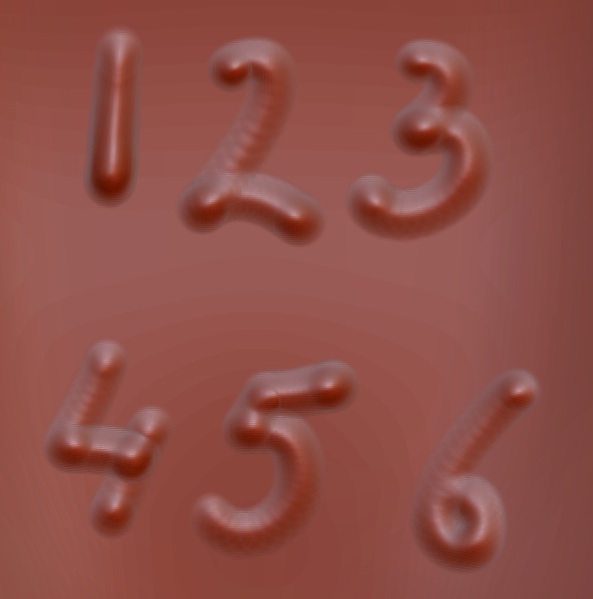
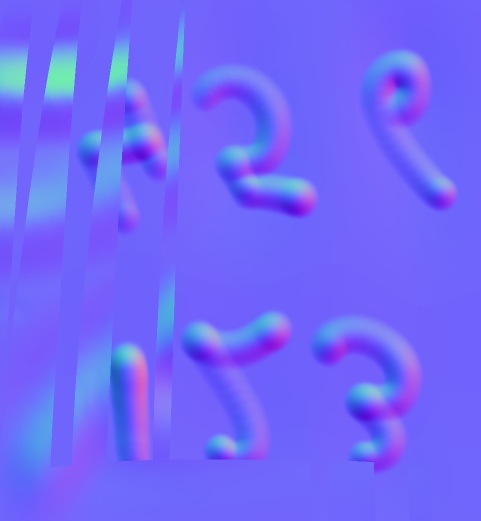
    * I’m getting these very very weird anomalies in the normal maps

Picture 1 is part of what I did in ZBrush and 2 is part of the normal map generated.

Attachments

Picture 1.jpg

Picture 2.jpg

Convert your NURBS to polygonsand stay with polygons. :wink: Zbrush only outputs polygons. You’re going to loose fidelity if you try to go back to the original NURBS object because their is a perfect UV-Map backwards from the polygon proxy.

If you already have a UV map assigned to you NURBS, convert to a polygon object and Zbrush will load the UVs when it load the .obj. You won’t need to make a new low-poly proxy with new UVs as above. Packed UVs are actual an un-peeling by polygon and then mapping each polygon individually into the UV space. It’s not really not a traditional flat projection, although flat-ish areas might group to look like a projection.