ZBrushCentral

Normalmap artifacts with SmoothUV and a Adaptive problem

I bet my adaptive problem is pretty common, but would be nice to know the problem. Because it seems these normal maps with adaptive on looks more detailed. I make the UVs with UVMaster, great tool btw.

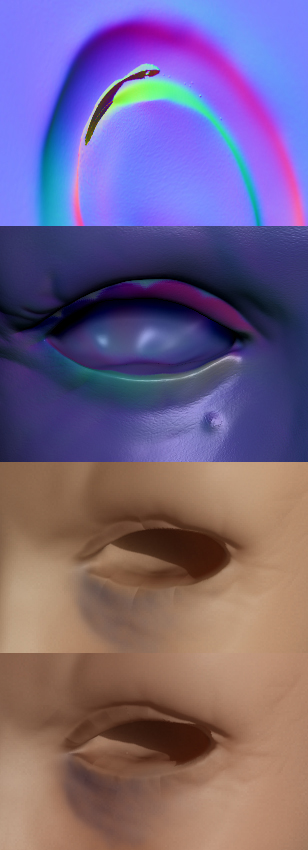
Under you’ll se four pictures:

  1. With adaptive there are some areas that get these weird artifacts, like it cant handle that much detail or bend. ( Ear )

  2. This is how the normal map looks when haveing SmoothUV turned on.

  3. This is how it looks in 3D Max, rendered with mental ray.

  4. Without smoothing the mesh doesnt get these bumps ( they are straight inside zbrush too ), but you’ll still see the parts where the normal map is not smoothed. ( color changed because I added a texture before taking this compairing picture :slight_smile: )

[Normalartifacts.jpg]

The second problem comes from the differences in your LP mesh and your HP mesh. They aren’t close enough to one another to properly “bend” around the eye.

The first one is a problem with the raycasting distance as well as the meshes not lining up close enough.

As far as I know you can’t fix either of these problems with the tools provided within Zbrush…which is why I don’t bake in it. (I could be wrong though).

I use xNormal to bake in case you wondered.

I figured out that I dont get these bumps if I use the PUVTiles option in ZBrush. But I still get these adaptive artifacts, so I’ll check xNormal out. I bet it’s better than ZBrush’s baking option.