hello all, to make sure i have my bases covered:
3Ds Max 8
ZBrush 3.1
Photoshop CS2
I made and unwrapped the base model of the shoe in 3Ds Max before exporting it as a .obj for Zbrush.
in Zbrush I subdivided to 6 levels and sculpted the detail using layers. i used Displacement exporter to setup the displacement and normal map export options. i exported 8 bit because 16 bit didn’t look any different and 32 bit had no information. i set it to NO smoothing and used A.D.Factor for Scale. in the Export Normal and Export Displacement menus i set each to Adaptive with a resolution of 4096. i then went to the highest SubD level and using the Multi Displacement 3 plugin and got the info from the mesh. i then dropped the SubD to level one and created all 2 of the maps.
back in 3Ds Max i set Bump to 100% and applied both the normal and displacement maps to my shoe model using the Normal Bump map slot, and being sure to flip them along the vertical axis for proper alignment. their intensities, by default, are set to 1 and use Tangent coordinates.
now come the problems:
-
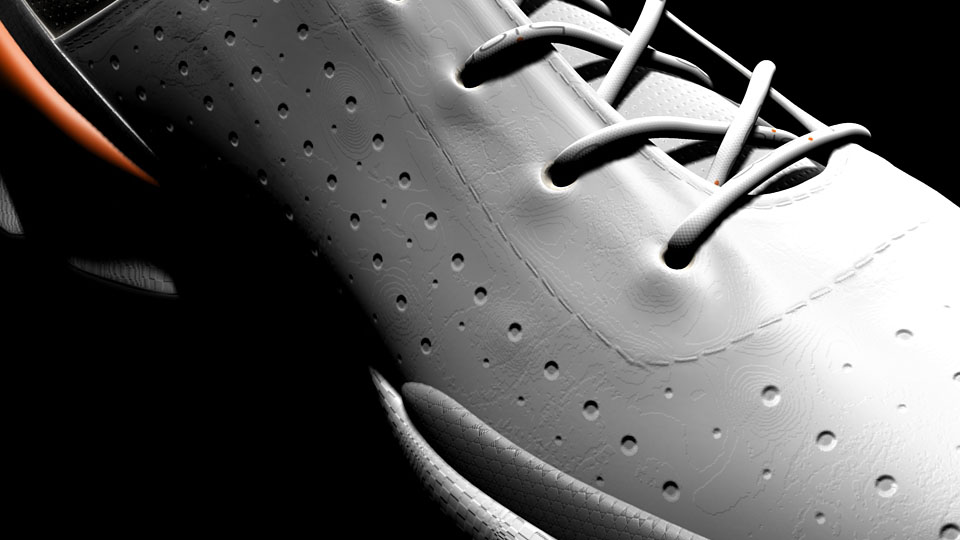
it seems that the range of greys (displacement) and the range of colors (normal) in the maps is very narrow. this there seems to be a considerable amount of “stepping” or “posterizing” between the values. this makes it so that anything closer than a wide shot reveals the stepping. this is a problem because i need to focus on the details of the shoe. upon further inspection of the displacement map, it seems that the full values of black and white only appear on the edges of my unwrapped UVs where there is little to no actual sculpted displacement detail to begin with. (image 1 displays the stepping problem)
-
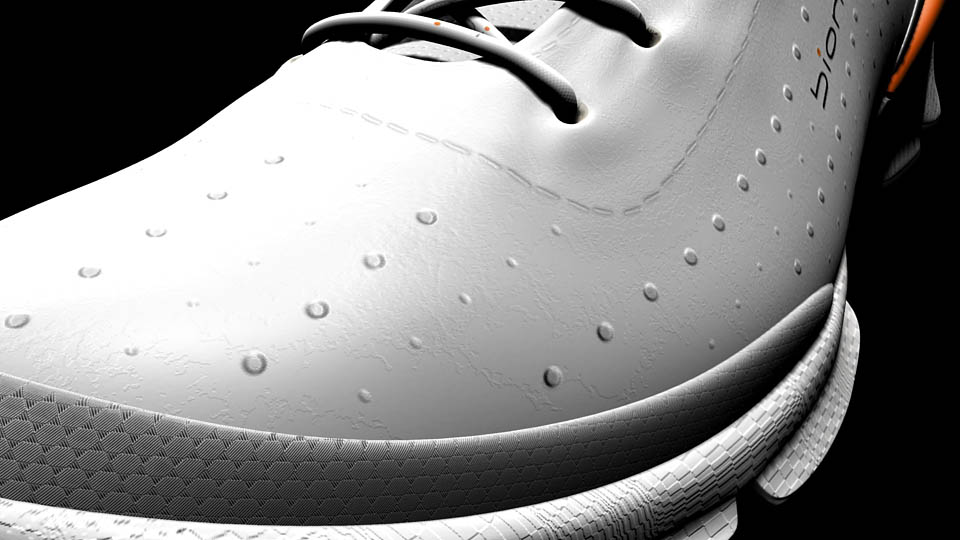
the bigger, and therefore more critical problem is that while the normal map will look correct on one side of the shoe (instep/arch of foot - image 1), it will be inverted on the other side of the shoe (edge/blade of foot - image 2).
what am i doing wrong? has anyone else encountered these problems and how do i fix them? time is critical so i thank you in advance for the prompt replies.
- Eric
Attachments