ZBrushCentral

normal map question - im a noob

The normal maps I create in ZB just are not right. I cant figure out what i am doing wrong. i know that i exported my mesh correctly, and my UVs are laid out nice, so i dont think its that…hopefully it is an easy fix.

here is what im getting. HELP…any suggestion will be appreciated.
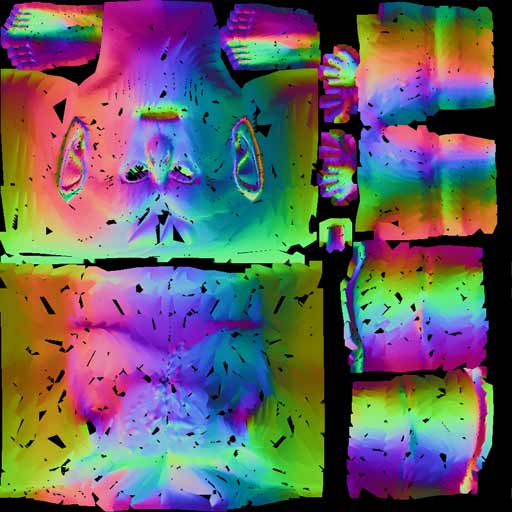
poop.jpg

sorry if i posted this in the wrong thread. i got a little excited.

reset xform

That sounds so easy, and thanks for the help;

however i cant seem to find any “reset xform” options.

oh yeah…Ghost Recon is great. its an honor to get help from someone of your caliber. thanks

reset xform is a 3dsmax utility , its in the little hammer section on the command panel

dunnoif thats the answer to problem tho … although im no expert in this area i’ also check that everything is welded correctly etc too

cheers

thanks…my normal is nice and smooth now. im not sure what that xform does, but ill do some research.

Is this a common mistake or did i do something crazy wrong during modeling?

please keep the suggestions coming

Yeah transforms get screwed if you scale models (cleanest way to do this is in sub object vert mode) , you can check this if you right click the scale icon and checking if the x y z are all at 100 %

Unfortunately im no expert but it has something to do with object based tranforms vs world space transforms / pivots

my brain hurts just thinking about it

…my brain doesnt hurt, but my eyes are burning…i need to figure this out so i can sleep more.

Is there any way that i can fix my mesh in 3dsMax, import it back into Zbrush, and still use the same tool that i modified in ZBrush with the previous (messed up) version of my mesh?

does that even make sense?
…i think im screwed

thanks for the help…

I would like to know aswell.

Does xform repair, change the point order? If not it should be as easy as reimporting base model, like updating screwed-up UVs. I dont have max installed or I would have tested it myself.