ZBrushCentral

Normal map problems

Hey everyone,

I’m fairly new to zbrush, and I was just wondering if I could get some help with a problem I’ve encountered while trying to export a normal map for use in max.

OK, so I created a model in max, unwrapped it and xformed it, sculpted it in zbrush and when I tried to export the normal, I got this: laila08_nrmltst_wrong.jpg
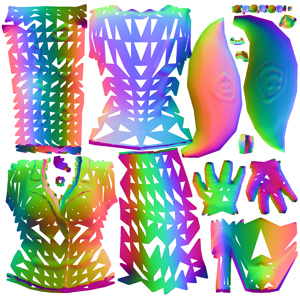
A normal map with loads of triangles missing from it. I tried unifying all the normals both in the edit mesh poly bit, and with the normal modifier all to no avail.

Any ideas on what I’m doing wrong?

Any help you can give would be much appreciated, I’m going mad with this one! :slight_smile:

Cheers

Nothing’s wrong with the map. It’s your model’s UV’s. Max butchered them on export. In Max, make sure that # of Digits is set to 6 in the export dialogue. You’re also probably going to have to reset the xForm.

Hey aurik,

Thanks for the reply. I’ve tried the xform modifier and I have the #digits set to 6, but it’s not making any difference. is there anything else I can try?

Cheers

Hey aurick,

Thanks for the fast reply.

I’ve reset the xform, and #digits is set to 6 for sure. Is there anything else I can do? I know I can do the UVs in zbrush, but that gives me a bad result on the colour texture. I have made some models like this before, and they worked fine. I’m just really confused as to what’s gone wrong. (and I’d just love to know how to fix it! :))

I found the tail that works fine is made out of a geosphere (all triangles) where as the rest of the body is quads (editable poly). I heard Zbrush prefers quads to triangles so why does it seem to work with the triangles(in the geosphere) and not the quads?

Thanks again

somewhere in max you’re breaking your UV’s

apply reset the xform.
then collapse the stack down to a ePoly.

Take that and apply a UVW unwrap modifier.
Grab all of your verts and weld them with a .01 or .001.

Then collapse that stack down to an ePoly again.

Export out that object and reimport your UVs

That should get you all set.

Hey goast,

Thanks for that. I tried it though and sadly it doesn’t work. The normal map still has the missing triangles. I tried removing the tail object from the mesh and then did xform/UVs etc from there and that didn’t help either.

I also tried xforming it after I did the UVs but that made no difference. Is there anything else to do? or is the model pretty much messed up?

Cheers

you can unwrap it again. Other than that I’d have to see the actual model.

OK Guys,

Problem solved!

Turns out I was using the wrong xform on the model. I was applying the xform modifier rather than using the one in the utilities panel…D’oh!

Thanks a lot for your help, it put me on the right track for the xform thing.

much appreciated :slight_smile:

Cheers