ZBrushCentral

Normal map corruption

Hi All,

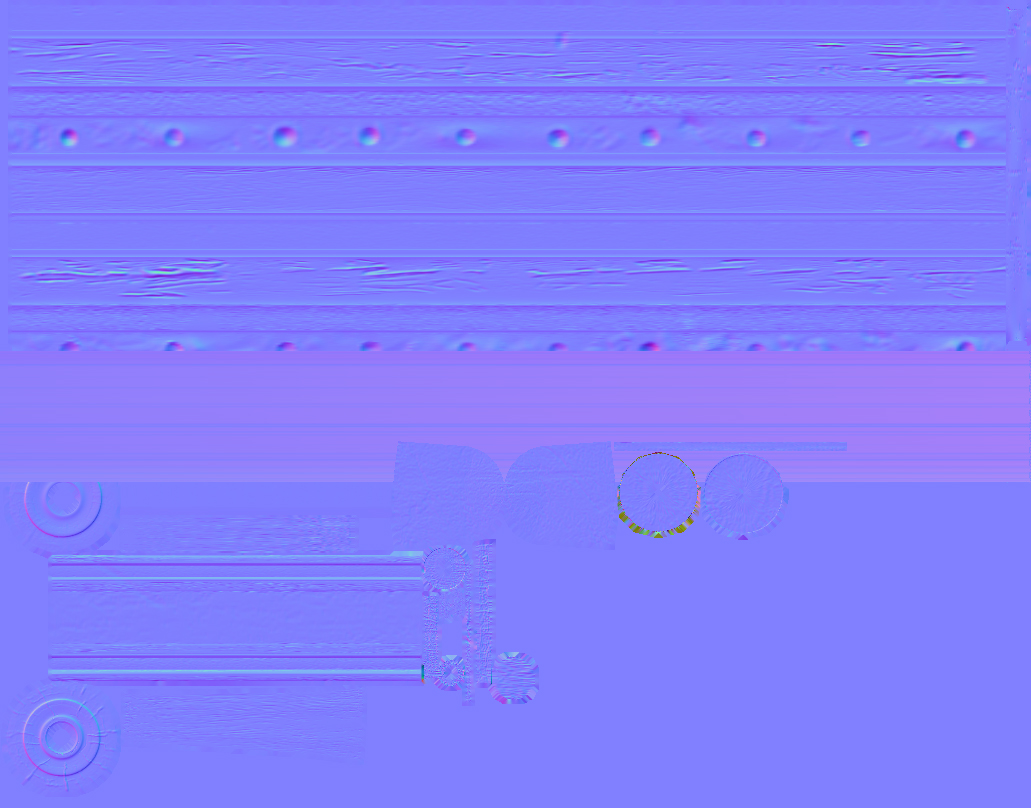
Just having an issue with generating normal maps, basically Zbrush creates the map OK, but it has a stripe of corruption across part of the map ( see attached crop of image) which renders it unusable. Has anyone had this issue & knows how to get rid of it??? Any help would be greatly appreciated. Is there a way to check the UV layout in zbrush to check it has transferred OK??

Cheers Polyglot.

Attachments
normal_corruption.jpg

Tool: Texturemap: New From UV Check

The most likely cause is that you have a UV point touching or extending beyond the 0:1 UV Range. This causes the coordinate to wrap back around the texture in zbrush, which creates a streak across the map. Scale in the UVs a bit or adjust the offending UV coordinates and it should be fine

Hi Cryrid,

OK thanks I do have some of the uv’s quite close together I’l re-adjust & see how it goes & let you know…thanks!

Cheers Polyglot

Hi Again,
Sorry to be ignorant but what exactly do you mean when you say 0:1 UV range I’m not familiar with that expression…:o

Cheers Polyglot

0-1 means 0,0 = bottom left corner of a grid or 0 in x and 0 in y and 1,1 = top right hand corner or 1 in x and 1 in y. I am assuming you’ve taken basic algebra.

UVs only display within 0-1. You can go outside of 0-1 but 1.2x and 0.2x are basically the exact same thing as textures tile beyond that (unless clamped).

I’m not sure what you unwrapped in, but almost every application has a default display area of 0-1.

HA! hell no I wagged just about every maths class I ever had…but I know what you mean & it was the problem one small section of uv’s were about a pixel over the edge of 0:1 so when adjusted it solved the problem. Thanks Cryrid once again spot on the money with your advice & thank you both very much for the help much appreciated! :+1:small_orange_diamond:+1:small_orange_diamond:+1:small_orange_diamond:+1:small_orange_diamond:+1:

Cheers Polyglot