ZBrushCentral

Normal map annoyance

Hey

I’m having a problem when exporting my normal maps through Zmapper.

I don’t know if this is normal (no pun intended) or not but the normal maps turn out with not only the fine detail but it seams that it tries to add the subdivision deformation on top aswell.

let me explain. If i where to take a low poly model and divide it a few times then go straight to Zmapper and export a normal map i would expect to get a clean blue map but i don’t… its covered with bumps.

Is there a way to correct this?
im sure there is just some thing in my work flow thats off.
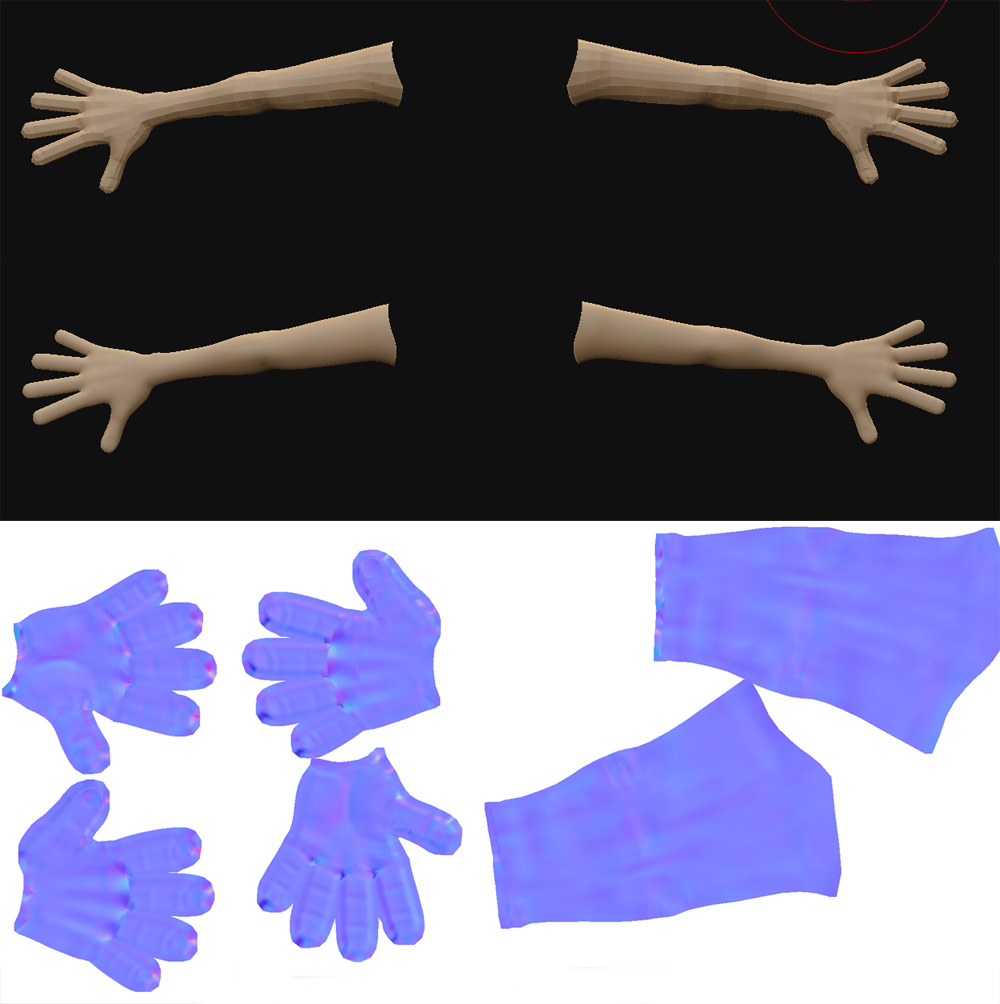
Could you show an example?

Normalgen.jpg

This example has not been sculpted in any way.

lowres from maya
divided 4x

zmapper normalmap…

Now when i use this map on a smoothed model in maya it has the smooth plus the extra bumps on the normal map and that looks funky.

This example dosn’t have extra sculpting detail, to allow better understanding of the issue. The actual model does :slight_smile:

Ive found that by increasing the subdivision prior to importing it minimizes the effect. but i’m just puzzled why no one else has brought this up (that i have found) which leads me to believe i’m doing something wrong

zmapper takes ANY changes from lvl1 (if that is where you calculate the normals from) all the way up to the highest lvl. So even though you’re just “smoothing” the model, there is still a change to the geometry. That is why the larger forms are showing up in your normal map. If it didn’t…there really wouldn’t be a reason to have a normal map…a bump for pores, etc would work just fine…and then we would all just be vertex pushers again. shudder

Anyway…if all you’re looking for are the fine details…take your mesh into Zmapper 1 level below the highest. That way all it will calculate is the difference from lvl6 to lvl7 lets say. If your pores and all that jazz are on lvl 7 then that is all that will actually transfer and show in the normal map.

I hope this helps you out a bit.

I think the reason no one responded besides aurick was the way you explained the problem “its covered with bumps” When we all look at your map it looks exactly like we would expect it too look.

Anyway, good luck