Hey guys I just finished sculpting a project for my portfolio and came to the all mighty normal map + Displacement map generation time. So I followed these steps:
- I model did no have a UVW map sense I tend to unwrap the 2nd or 3rd layer pending on the model. So I deleted the layer one on a pendant model and exported the new layer one as a .obj.
- Imported said .obj using default settings in 3DS Max 2011 and UVW Unwrapped it. Converted the model back to a poly to collapse the stack and Exported it as a new .obj file to bring into zbrush.
- Opened my ztool that I exported the lowest lvl and imported the model with no errors.
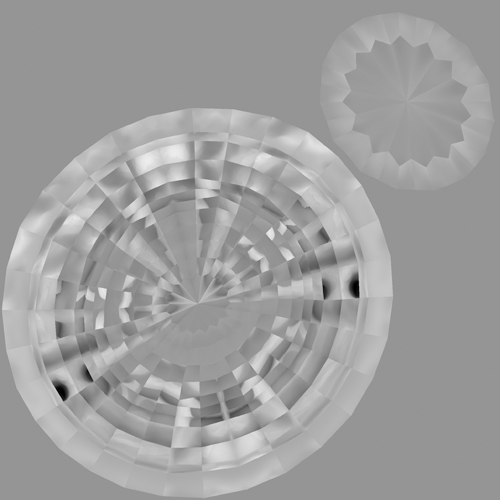
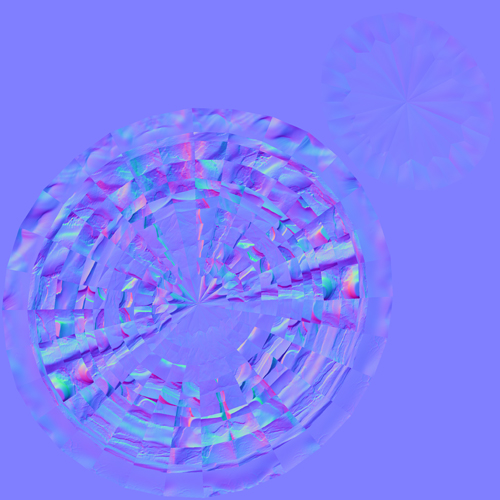
- Generated the Normal and Displacement map in Zbrush 4 with the default tools but frowned that the image was fragmented for some reason.
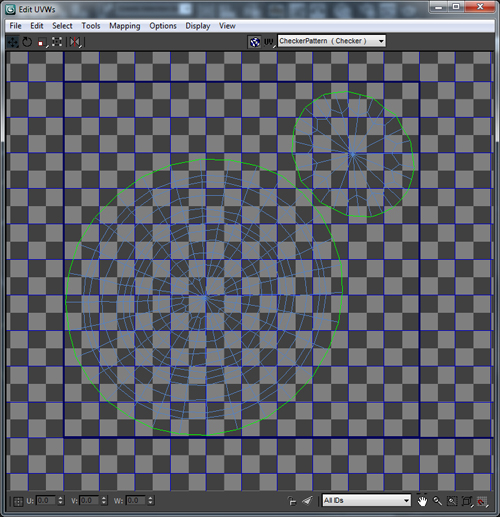
I provided a screen shot of my unwrap in Max, Normal map, and Displacement map for you look over. Can any one tell me whats going on here? It looks like Zbrush literally took the poly faces and flipped them around.
I used the default export and import setting to hope between the programs and messed around with them to no luck. Why is this happening? Do I have to use JUST UV MASTER now and if so how will I touch up on maps it dose not generate to my needs? Granted its a great plug in but I still feel it dose not divide things to the best of its abilities.
Thank you for your time and help.
3DS Max Unwrap:
3DS Max Unwrap.jpg
Zbrush Displacement Map:
Displacement Map.jpg
Zbrush Normal Map:
Normal Map.jpg
Attachments