ZBrushCentral

Noob in need

I am new to zbrush and thus have a few noob questions for which I need answering before i can finish my first project. I have created this model to near completion but have run into a brick wall. I would like to pose this model, however, whenever i go to rotate a joint, the mesh in that area is pulled to oblivion. I thought it was because my first build was made without the use of any subtools but now that i have created the head as an independent subtool, i have found that when i go to rotate it, the z-shere representing the head (where all the spikes attach) MOVES in the same fashion as if i were using the move function. I have slaved on this model and realize that i should probably use z-spheres 2 but my sculpting skills are a bit too low for even a simple model as this one. I was wondering if anyone could help me with this.
In addition, I am curious if it is possible to transform a masked area into a subtool itself. I will likely have the same problem posing the arms and legs as i did with my first model because they are not separate subtools and will thus pull the mesh. I would use the “move” function if not for the likelihood that i will make one appendage shorter than its partner.

catches breath

Finally does anyone have a recommended program to convert the PSD documents to JPG? I really hate this stupid watermark that i have on mine.

Attachments
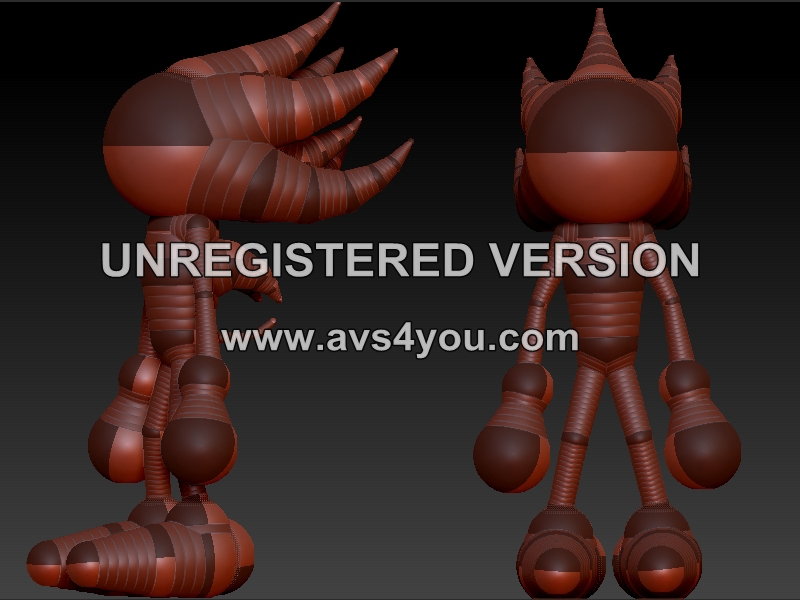
Super Sonic Zspheres document.jpg

Hello Isonda 706,

Are you trying to pose a zsphere model or a polymesh model?

First, the answer to your question regarding the masking is YES. :slight_smile:
You can create a new SubTool from a masked area. This is great for things like jackets and stuff like that.
Please see here:
http://www.pixologic.com/docs/index.php/Mesh_Extraction
http://www.pixologic.com/docs/index.php/Mesh_Extraction_with_Masking
I guess that`s not what you need in your case, though.
If you want for example that your models left arm is a different SubTool, please see here for a step-by-step explanation about splitting a mesh into different SubTools:
http://www.pixologic.com/docs/index.php/GrpSplit:_Splitting_Your_Mesh_Into_Subtools

BUT is that right that you think you can pose a model only if you have different SubTools for the arms and legs, etc… ? That`s not so. :slight_smile:
If I understand your post correctly, I think this will help you:
http://www.pixologic.com/docs/index.php/Transpose

I recommend to watch the videos in the ZClassroom. Here`s the link:
http://www.pixologic.com/zclassroom/
There are tutorials about Zspheres and Zspheres2 and also about the Transpose functions (and many, many other things). :slight_smile:

Last but not least:
You can download irfanview to convert your PSD files into JPG.
http://www.irfanview.com/

I hope that helps and I hope I understood your questions correctly.
If you need more help/infos you have only to ask.

Edit: If you want to pose a model that has multiple SubTools you need to work with the Transpose Master. See here:
http://www.pixologic.com/docs/index.php/Transpose_Master
(When youre using Zbrush 3.5R3 you dont need to download this Plugin, it`s already built-in --> Plugin Palette)