ZBrushCentral

Newbie Workflow Question

This is my first post here, so please be gentle!

I started to do a sculpt in ZBrush, and when I was having issues with the topology I took the model back into modo to correct it. When I jumped back into ZBrush, my sculpt had a couple of ‘craters’ in it.

Can this be fixed?

I had jumped between the apps a couple of times, but this is the first problem I have encountered. Any help would be much appreciated.

[ATT=]head.jpg[/ATT]

Cheers

Muzza

Attachments
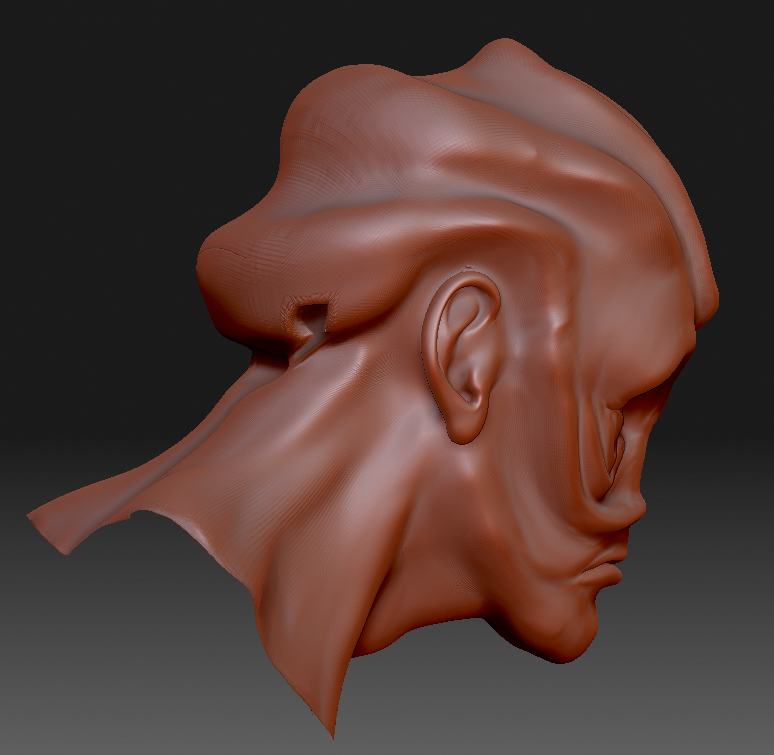
head.jpg

I don’t have any experience with GoZ (which is what I am assuming was used to “jump back and forth”). Making topological changes and using projection to recapture the detail is probably always going to be subject to occasional errors like this. But errors like that can be fixed…with a bit of effort.

  1. Are the defects symmetrical (on both sides?). If not, simply Mask the “good” side, then use “smart resym” in the deformation palette. For best results, repeat the process for every subD level.

  2. If the errors are on both sides, start at the lowest subD level, and apply a bit of smoothing to the area, and work your way up each level doing the same thing, then retouch the detail.

Thanks for replying Bingo Jackson.

The defects were on both sides, but following your steps I have a reasonable place to begin detailing again.

Thanks again.