ZBrushCentral

newbie UV issue

Hi,
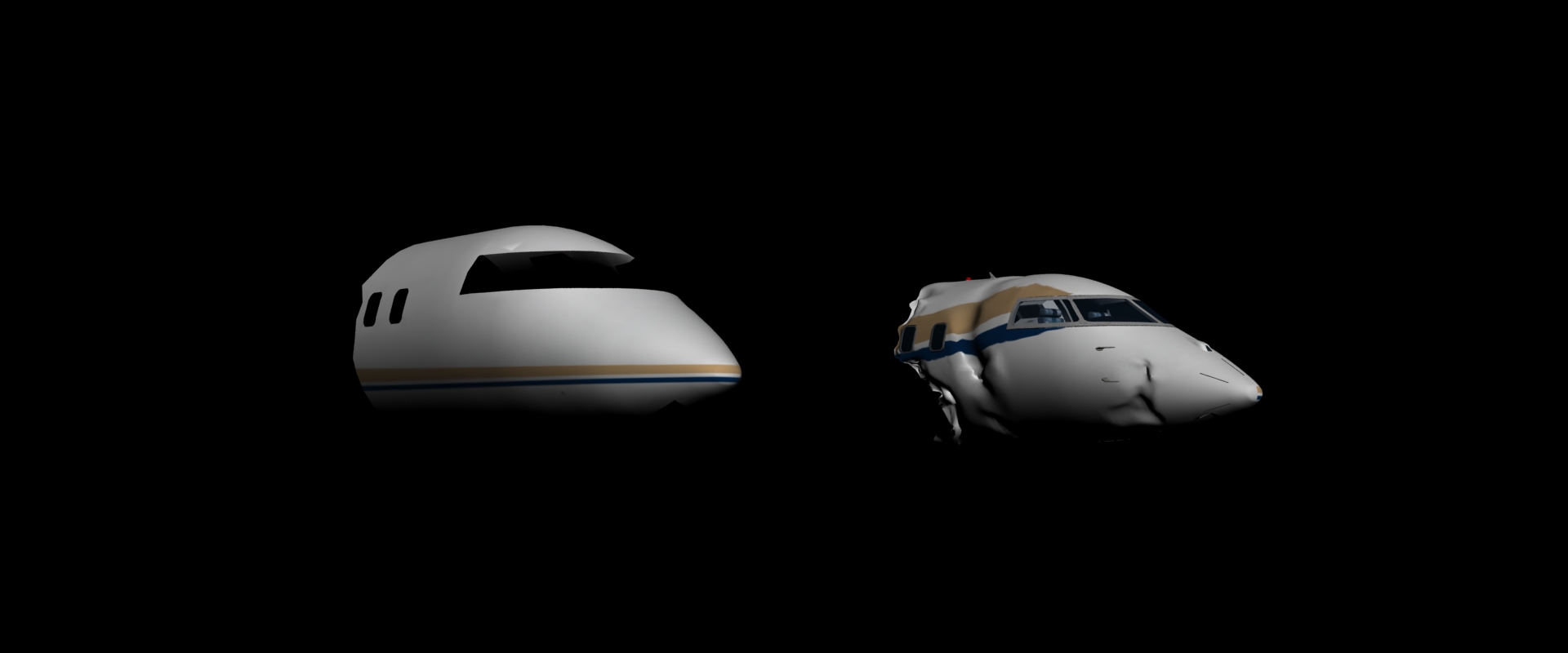
I’ve exported a model with UVs from Max as an obj. I’ve then sculpted this in Zbrush. When I export back to Max the uvs appear to be exactly the same ( as I would have hoped ) but the texture doesn’t seem to be behaving. This may be a Max issue rather than a Zbrush issue but if anyone can help it would be greatly appreciated. I’ve attached a render.
Cheers
M

Attachments

uv_issue.jpeg

Nevermind, I should have looked closer at the render. :slight_smile:

If the texture was created in Zbrush, you may have to flip it vertically before or after exporting.

That’s what I originally said, but looking closely at the two I noticed the gold line is above the blue one in both renders. This is a strange one, almost as if the UV’s have changed (Edit: Except he said they didn’t).

Yes the UVs are identical - I exported them and overlaid them in photoshop and they are in exactly the same position - just higher res. I must have done something wrong along the way. Thanks for your help anyway.

Yes the UVs are identical - I exported them and overlaid them in photoshop and they are in exactly the same position - just higher res

The UVs would still match up, zbrush will flip them back during export. But if it was used to alter/bake the texture, then the texture will usually need to be flipped manually.

That’s what I originally said, but looking closely at the two I noticed the gold line is above the blue one in both renders.

I suppose that could depend on what his UVs and texture originally look like, since that info wasn’t provided. If the UVs are split up and some islands are rotated or mirrored, the blue could be on top of the gold in the texture but look fine on the model. Or they can be oriented in a way that has the stripes run more vertically in the texture, which shouldn’t change its order when flipped vertically, just where they fall on the UVs.

Do you have more screenshots, mpidgeon? The original UVs, new UVs, the final texture, maybe the texture as it appears in the UV editor with the UVs overlayed on top.

He/she originally stated the UV’s were identical, meaning a vertically flipped texture (or vertically flipped UV, but not both) would result in the blue line being seen above the gold one when rendered. Since that wasn’t the case upon looking closer at the render, I decided my original post was incorrect because it couldn’t possibly be a vertically flipped texture issue (hence why I edited it). Now he tells us again the UV’s haven’t changed at all. So if it’s not altered UV’s or flipped texture based on the evidence, what else can it be? I’m at a total loss as to what ZBrush could have possibly done to his/her mesh to cause what we’re seeing. There doesn’t seem to be an issue with the texture/UV’s on the other side of the mesh either based on the little I can see of it near the aircrafts nose. This puzzle really has me confused lol. :slight_smile:

Since that wasn’t the case upon looking closer at the render, I decided my original post was incorrect because it couldn’t possibly be a vertically flipped texture issue (hence why I edited it). Now he tells us again the UV’s haven’t changed at all. So if it’s not altered UV’s or flipped texture based on the evidence, what else can it be?

Thing is, there was absolutely no evidence presented to show what the texture itself looks like, or whether or not it was flipped. When asked about the texture, the only reply was that the UVs on the mesh were identical. UVs /=textures.

So that brings us back to the only evidence we do have; parts of the texture not being placed where they originally were on the model. That can be a symptom of the texture being different (especially if the UVs are not). You insist it is not possible because the lines are in the same order, but that’s not a call we can make when we know absolutely nothing about the UV-orientations, what was done to it in zbrush, or how the new texture appears on them as far as Max’s material/UV editor goes (hence the request to have this information provided). It know it is possible to flip the texture and maintain the orientation because I can recreate something similar based on the UVs.

This is beginning to feel like a case of Occam’s razor gone horribly awry lol. My impression from what s/he wrote is that neither the UV’s nor texture were changed and chose to believe these were the true facts based on what has been presented thus far. Combined with a careful examination of the before and after renders side by side (where we can see the opposing side may not be affected at all if you look closely), it seemed fairly clear that the only thing that had been done was to export from Max, do a bit of sculpting in ZBrush, then take it back to Max again where the render came out wonky. Exactly what s/he said s/he did in the first post pretty much. You’re right though, a more detailed description would certainly be useful along with any other facts that may be relevant. :slight_smile:

PS: I thought it was pretty obvious the texture had not been created in ZBrush based on everything presented. Just in case you might be running a script blocker or something, I have to ask whether or not you are able to see the two 3ds Max renders that were originally posted. Hopefully we can get to the bottom of this and help mpidgeon out which is all I really care about.

I’m not sure why you’re having a hard time here. I’m starting to get the vibe like you feel your solution is the only thing possible, and if you couldn’t answer it, then gee whiz it must be a weird zbrush fluke and everyone else should just give up trying? Instead of opening the thread to valid and entirely possible scenarios that work alongside with the information that was provided (especially when it deals with a very common issue for beginners due to what zbrush automatically flips and what it doesn’t), you’re just getting defensive and insist on shooting them down with zero knowledge of what was actually done.

UVs are not textures, the word is interchangeable as you see fit. No information about the texture was given, so you can form all the impressions you want, but they’re not going to carry much weight when you’re reading words that were never there to begin with. A flipped texture is all it takes. It doesn’t matter if the texture was originally made in zbrush, only if it was brought into zbrush at some point. If the guy already had a textured model and zbrush can support textured models, why assume they were never used and that any assumption of them being used is wrong? No information was given in that regard, so again it’s entirely in the realm of plausibility. And to be honest, in that particular case it wouldn’t even matter if the original texture could be found unflipped as a second texture can very easily be created when that occurs (exported by zbrush and automatically referenced in the .mtl). Likewise the second half of the plane doesn’t matter either as it again falls back to the particular UV orientations, how the mesh was split up, and the material settings that Max is seeing (information that wasn’t provided outside of your mind).

So, with the (actual) information that was provided (and yes, I can see the image just fine), I can recreate similar effects simply based on how I lay out the UVs and what I do with the texture. It’s perfectly cool if OP comes back and provides additional information that would help narrow things down, but until then I don’t see how its helpful to shoot down valid suggestions just because you dont want to seem wrong for second guessing yourself.
I was going to type up a lengthy reply to each of your points and which clarified what I was attempting to get across, until I realized it would just be easier to roll my eyes and move on. You’ve read things into the conversation that were never said, misinterpreted other things, and made several incorrect assumptions about my character. That last part shouldn’t have even come into it and made me realize my efforts would have been wasted and pointless most likely. I understand how UV’s and textures work. I know flipped textures is a common issue with ZBrush (provided his preferences were incorrect to begin with). My troubleshooting style, which is obviously what you have a real issue with, involves looking at all of the possibilities, bouncing hypothesis off of others, and eventually narrowing down the potential culprits until we arrive at an answer. Helping others doesn’t always have to be a one (wo)man job (unless all you care about is some sort of credit). For the record I never said it was some “weird ZBrush fluke”. If anything I gave one possibility as to why it might not be ZBrush which you shot down primarily because you didn’t understand what I was trying to explain. You also keep insisting zero information was given when that clearly isn’t the case at all. We know several facts (like the fact the UV’s never changed), and from all of those can infer other possibilities worth examining in addition to a vertically flipped texture, which would have been better than nothing considering the topic starter refused to come back lol. If you have a problem with me (and it’s clear that you do) I suggest you add me to your blacklist so that you won’t have to read any of my comments in the future. Take care, and good luck. This thread is all yours.

Edit: Also for the record I was never worried about seeming wrong. I too posted that it was most likely a vertically flipped texture since that is very common. Afterwards I examined all of the evidence provided more closely and realized there was a good chance that wasn’t actually the culprit. I deleted the post to prevent confusion, primarily because he wrote “newbie” in his/her topic.