ZBrushCentral

Newbie Question here

Hi I’m new to Zbrush and I got some questions I hope you experts here could help me with.

I was wondering how I can retain the details from my Zbrush model when I bring it to 3DSMax.

What is the best way to go about it? Normal Maps? Displacement Maps?

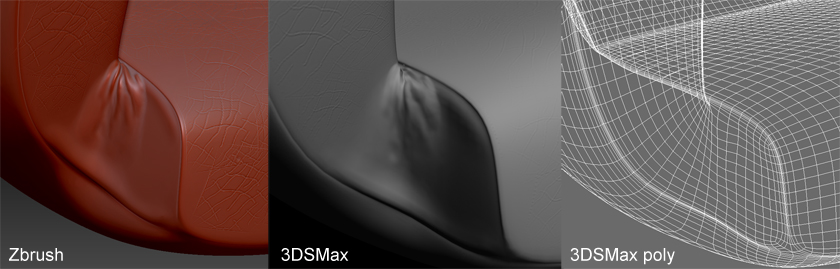
As you can see in the image, the detail is lost when I export it into 3DSmax and applying only a Normal Map on my fairly low polycount model.

I really hope you guys can share some tips or point me to a good tutorial about how I can retain nice details into 3DSMax.

Thanks in advance :slight_smile:

Attachments

Normal Question.jpg

You may want two maps in this case: a normal map for high frequency details and a displacement for the medium frequency stuff.

To do this, save your model and drop down a couple subdivision levels from the highest. Create your normal map. Since ZBrush creates maps by calculating the difference between the current level and the highest level, this map will only have the details from the highest levels.

Now use Tool>Geometry>Delete Higher to remove those upper levels so that they won’t be included in the displacement map calculation. Go to level 1, restore your base mesh and create your displacement map.

You’ll get the advantages of how a displacement map deforms the silhouette of the model and makes the big details pop while still enjoying the speed that a normal map provides for those details too small to affect the model’s shape.

Thank you so much aurick, I’ll do some tests on my model by following those tips you gave me :slight_smile:

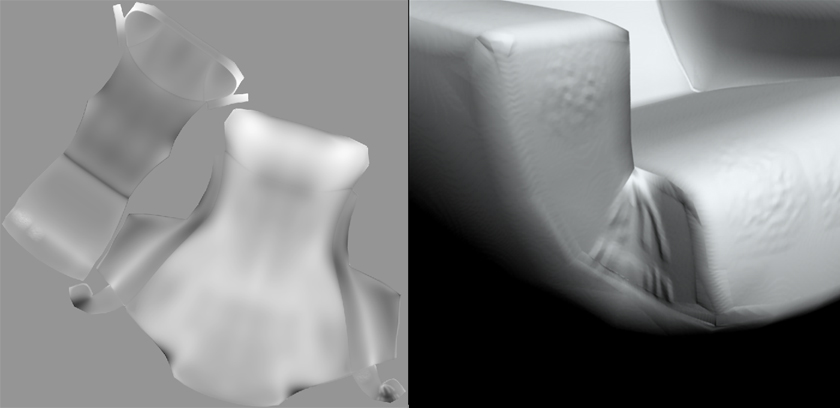
Displacement Map.jpg
I did some tests on the Displacement map. I must be doing something wrong since the Displacement map displaces the entire mesh instead of just the folds on the corner.

The result is a bloated mesh. The entire mesh is displaced making the whole surface rise.

As you can see the Displacement map is mostly gray. Should it be mostly black and whites?

//youtu.be/1U6c_u-f9L8

This somehow solved my problem with the displacement map.

If there is a better way I would be glad to know. I’m using VRay by the way to render stuff.

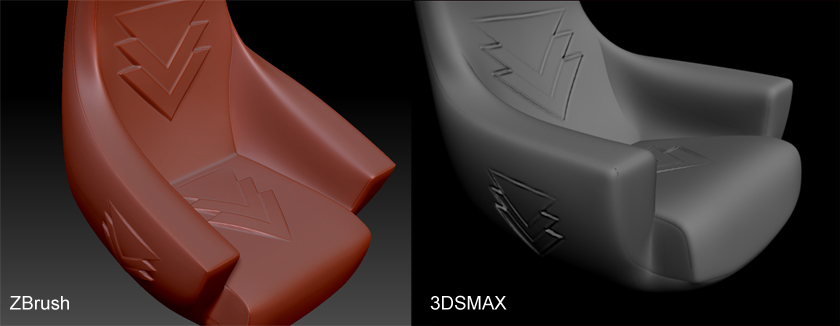
Zbrush.jpg

Are displacement maps capable of deforming mesh with turbosmooth almost identical to the zbrush model?
Because as you can see in my tests the bulges on the arrows are totally flat when it comes into max.