ZBrushCentral

Newbie in need of Help!

Forgive me if this is posted in the wrong place. I’m new to the forum aswell.

I decided to mess around some for the first time with Zbrush and decided on trying to get a sculpted fish exported to cinema4d. However I encountered quite some problems and now I’m fairly to extremely stuck…

I sculpted a fish (and maybe quite recklesslessly I subdivided and subdivided the mesh). Then I textured it using Spotlight and Polypaint.
Here comes the rub: I only really know how to export the OBJ and haven’t really found out how to export the textures. I figured I might have to use the UV Master plugin to create a UV map with the texture embedded in there (correct me if I’m completely wrong!)…
Using the UV Master plugin I stumble upon new problems: I try to clone the object in order to have a copy of my fish with a reduced polygon level…however it’s never reduced and the fish stays fairly the same with the same ridiculous amount of polygons; when unwrapping the model my programme crashes, probably due to having to deal with so many polygons. I tried to reduce the number of polygons through the geometry tool, however there’s nothing that’s selectable in that section anymore… I can’t subdivide or undivide, not increase and not decrease polygons. Shift+D doesn’t do nothing (My fish is in editing mode though).
Only if I make a polymesh3d at the Tools Palette (again? I don’t understand) I can reduce the polygons…but then my texture gets lost which isn’t supposed to happen.
What bothers me aswell is even though I have a ZTL of my fish and an OBJ; in Zbrush it’s textured. I can’t seem to find any reference to some kind of texture in my tool palette…

If the above just seems like odd non understandable rambling without an end my issue is this: I don’t know how to export both my fish and my texture to cinema4d. Everything I tried didn’t work and I encountered a lot of problems.

Last but not least: the difference between texturing, polypainting and UV mapping fairly confuses me and I think that’s the origin of my complete journey of flaws and failure towards creating my fish of doom. :lol:

If someone can help me out I’d be beyond grateful!

Attachments
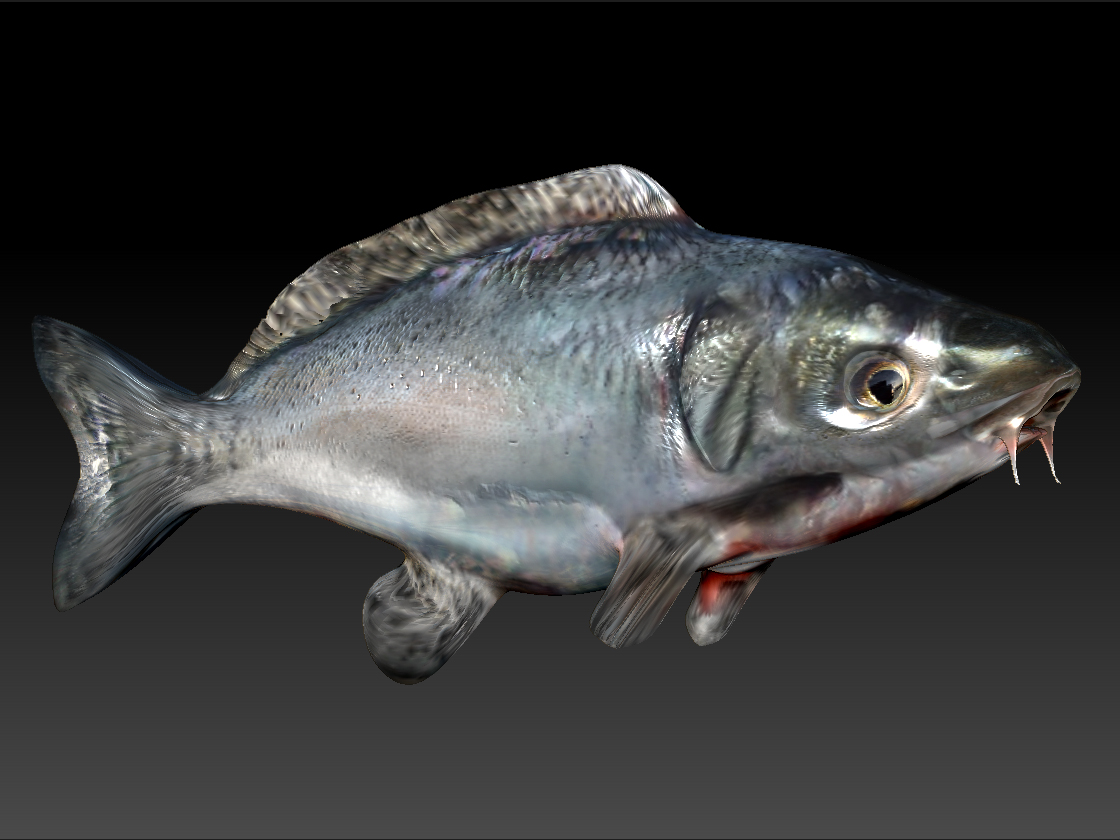
Fishofdoom.jpg

I’m a bit confused. Did you start out with a polymesh 3d object? I’m unclear how you lost your ability to return to your lower subdivisions. Did you mistakenly delete them? If so, try going into the geometry palette and hit “Reconstruct Subdivisions” repeatedly.

For the future: if you are planning to take a model out of Zbrush, and retopologize for better topology say for animation purposes, you should start with a polymesh 3d object, sculpt in your landmarks and while still at a fairly low polycount, retopologize and then export a version as an obj (with UV’s from UV master or you also retopologize and/or UV map in another program and reimport that model in ontop of your polypaint version to transfer your polypaint work to the retopo’d and uv’d version).

The polypaint texturing in ZBrush is essentially vertex painting. The information is stored in the model’s vertices so you need good subdiv/resolution for a useful texture transfer. You do not have to start out with UV’s. They can be made later and the polypaint is later transfered to them. Decide on a texture resolution ( in the UV sub palette of the tools palette - should be somewhat equal to the polycount - err …maybe that’s vertex count :eek: of the mesh) and then in the texture map subpalette of the tools palette (right of the workspace) press “New from Polypaint”.

Now select CLONE txtr and your new texture will be sent over to the Texture container palette on the LEFT of the workspace. You have to select it and Export it from there as a PSD, bmp or tiff. (this is also possible from the Texture menu drop down pallete). If you don’t “clone” the texture you can’t save it to a texture for export.


I had initially suggested importing the low poly model over the high one, but I just tested that and the polypaint and mesh disappeared. Don’t try it without a back up version stored.

Now I think I understand what might have gone wrong with your subdivisions. I’m guessing you drew out a primitive onto the canvas, pressed EDIT and then subdivided BEFORE you hit “make polymesh”. In this case your subdivisions START at the highest subdivision before you press make polymesh. In the future, unless you are using the primitives for 2.5 painting tools or making alphas on the canvas, don’t subdivide until you’ve pressed the POLYMESH 3d button.

Good luck!

thank you for your reply!
I think my main issue was definitely subdividing too soon. Somehow I had some magical moments subdivision did work, but then it freaked. Now I try ‘Reconstruct Subdivions’ it won’t work because “Mesh contains triangles” I definitely must have done something wrong with the topology and should read more into that. Now I don’t know where I can fix the topology lol. I think I better give up on the fish and try over from scratch, this time taking in consideration what you said.

I wouldn’t suggest fixing the topology, but you can re-topologize right over the original model you have and then project your sculpting details and polypaint onto the new retopologized form.

I think that this may be getting a bit ahead of things for you and you are probably best to start again from scratch, but read up on ret-opology in Zbrush (and in general 3d) and read up on projecting sculpting details and polypaint from one mesh to another.

Good luck!

I decided to sculpt the fish again, this time taking the topology more into consideration. Now everything worked and I got a texture. Thanks again for your tips and tricks! I’ll be more careful next time.

This is totally unrelated but I thought it might be useful ,

http://www.zbrushcentral.com/showthread.php?t=68060
Look forward to seeing more of your work
Goodluck