ZBrushCentral

New to ZBrush, ZSpheres Scaling/Zooming Issues

Hello Community,

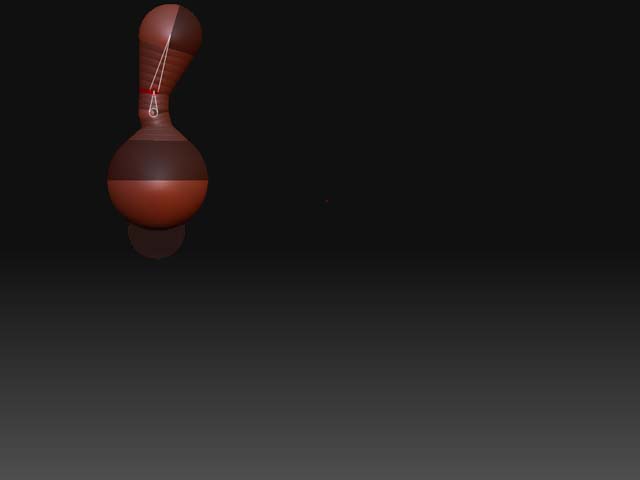
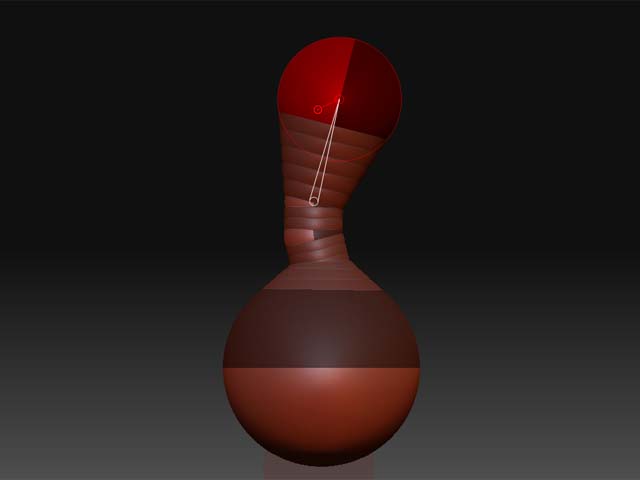
I'm a long time lurker who's finally gotten the time to sit down and start trying to learn how to use ZBrush, and I'm running into some problems with ZSpheres that have brought me to a stand still. I've attached a short series of JPEG's which illustrate the issue I'm having. Basically my problem can be summed up as follows: 1. Set Draw to 1 2. Choose ZSphere's Tool 3. Create Body Sphere, Toggle on X Sym with Mirror 4. Create Root Sphere, delete chain to make it a magnet. 5. Create Neck Sphere, drag to length and segment. 6. Create Head Sphere. That will get you to the simple sphere structure in image (01). Next start moving them around with the Move tool and you will suddenly get zoomed and shifted to the upper left as in (02). If you then hit alt and click on the background to re-frame the ZSphere model you will get (03) which sends the model flying off into the background. So far as I can tell the only solution to get it back it to switch to adaptive mesh (A) and Alt-Click on the background. This will reframe on the adaptive mesh and then I can go back and edit the spheres... only to have it happen again in a few clicks. It's incredibly frustrating and though I've found one or two mentions of the problem on the forum, I've found no resolutions. If I have to I'll contact support directly, but if someone in the community has seen this and figured out the why and how to fix it, I would greatly appreciate the help. Technical Details: Win XP, SP2, 32 bit, 2GB Ram, Core Duo 1.6 Ghz, Dell M90 Intuos 3, Driver 6.1.0-5 (most recent available) ZBrush 3.1 Things I have tried so far: Disabled Double Click Assist (though this happens with the mouse as well) Disabled Scroll Strips Increased Mouse Averaging[

](http://javascript%3Cb%3E%3C/b%3E:zb_insimg%28%27%27,%2701.jpg%27,1,0%29)

Attachments
01.jpg

02.jpg

03.jpg

its a known bug and has been fixed on the mac version i believe, when this happens i just hit undo and double tap the scale icon to frame it again.

Ah, well that’s a bummer. At least I know I’m not alone then. I’ll have to get in the habit of just dealing with it I guess. Thanks for taking a moment to confirm the problem. At least I won’t waste any more time trying to figure out what’s wrong with my tablet.