ZBrushCentral

Need some assistance with Project Subtool

Hello, this is my first post so if I need to provide more information on my problem, please feel free to inquire more. The crux of my problem is that when I project a high poly dynamesh to a retopo’ed low poly mesh made with a combination of Maya’s retopo tool and live surfacing, I come up with a lot of anomalies. I haven’t UV unwrapped the low poly model as of yet and I’m wondering if that would fix the current problems. Tips on workflow would be really great as well since it could be a problem with my general workflow which ends up creating these problems.

My current workflow is: Zbrush rough shape sculpt using a combination of move and clay build tools (Creating body first), creating the clothes from extrusion, merging the clothes and the body before exporting to Maya to low-poly retopo, bring it back into Zbrush to project, UV unwrap in Maya, bring back to Zbrush to retune details and create the details for normal mapping.

The problem areas are going to be marked below. There were some other areas as well, and I masked> deform> polish(ed) them out
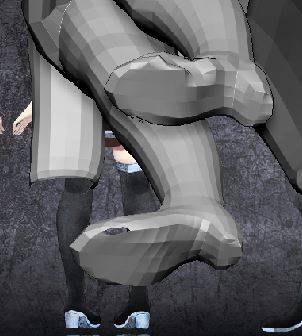
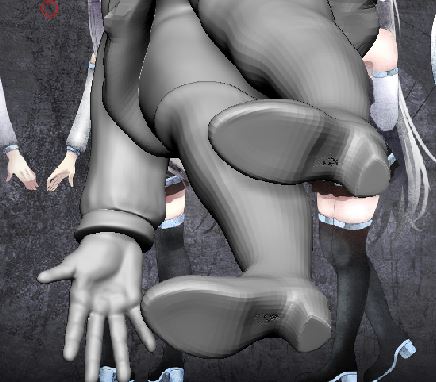
project issues.JPGproject issues main body.JPGlow poly project.JPGhigh poly dynamesh.JPG

Attachments

high poly dynamesh.JPG

What is your problem? I don’t understand what you’re tying to show in your images, or what each image even represents.

What is the end goal of your piece? Is this a 3D print, a single image, a game model, etc? Knowing what you want to do with it could help to inform you on how best to approach the problems you’re having.

My current workflow is: Zbrush rough shape sculpt using a combination of move and clay build tools (Creating body first), creating the clothes from extrusion, merging the clothes and the body before exporting to Maya to low-poly retopo, bring it back into Zbrush to project, UV unwrap in Maya, bring back to Zbrush to retune details and create the details for normal mapping.

I find it easier to just focus on the sculpt first. It might get dynameshed or zremeshed along the way, but I wouldn’t worry about the final lowpoly topology until its all done (since good topology for games/animation may not be good topology for sculpting). Once the sculpt is finished, then I’d do the lowpoly retopology and UV mapping.

I don’t do any baking inside zbrush, which means there is no need to project anything.

My main problem is that the project tool is creating holes and some deformations in the low-poly model. This model would be used for a basic unrigged portfolio piece, which also needs textures. I want to UV unwrap it so I can edit the model, but when I try to unwrap it, the projection issues are causing the UVs to also become warp. Basically this piece is also practice for creating low-poly models as a game asset.

Oh thanks for that tip! I’ve been juggling the technical aspect with it while sculpting but that makes a lot more sense. I’m curious though I haven’t had much experience with different modes of retopoing, but how do you do the lowpoly and UV unwrapping while not needing to project?

Projecting is only needed inside of zbrush, which uses the subdivision levels of a single mesh to create textures. Other tools (including xNormal, Maya, Substance Painter, to name a few) will let you load multiple different meshes for the high and low poly objects, as long as they occupy the same general space. These baking tools use rays that start a certain distance away from the lowpoly, then cast inwards. When a ray intersects the sculpt, it records the surface detail and saves that into a texture map using the lowpoly’s UVs. This means the two resolutions can have completely different topologies, and only the lowpoly model needs to be UV’d. You can also get a lot more control over your textures this way (such as specifying which tangent basis to use for the normal map).

OH wow! That’s really good information, that seems like it would be a lot better when trying to control the output than Zbrush’s project. I happen to have XNormal installed, but didn’t have a complete grasp of it. I think I will try to do this within xnormal then. Thank you for the advice btw.

Edit: On a side note, because the rays cast inwards would it be best to have the low-poly be somewhat larger and more encompassing than the high poly mesh? If I’m understanding this correctly it would work closer to a normal and bump map right? Or would it be closer to a displacement map where it actually alters the surface of the mesh?