ZBrushCentral

Need help with Spotlight feature [Solved]

I am new at ZBrush. Not sure if this is right place to post this topic. I am learning it. I have ZBrush 4R6 running on an Acer Laptop with Windows 7.

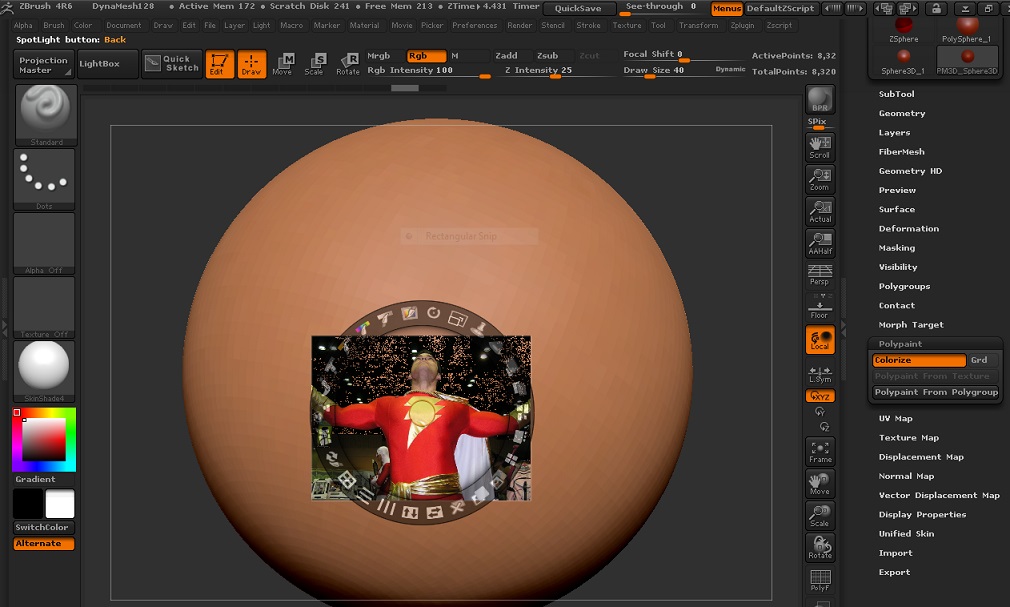
I am trying to learn the basics of the Spotlight feature. I pretty much have most of the basics down, however I am stuck. Not sure if you can see my picture. But I cannot figure out for the life of me how to clone and get it from the clone to get it to paint onto the sphere I have? I am trying to clone the lightning bolt to the sphere. It just doesn’t want to paint when I move the spotlight to the sphere. I am assuming I am missing a step. I watched the tutorials but they aren’t really showing you in detail how to get it to transfer to the sphere. Again, I am learning so it could be me misunderstanding or missing a step. Thanks in advance.

Matt

Attachments
ZBrush.jpg

Hi Matt, This should be posted in the Questions and Troubleshooting forum. Nevertheless, the Spotlight Clone feature is for cloning from one Spotlight image to another or from within one image to another part of the same image. To transfer “paint” from the image onto a subtool make sure you don’t have any of the image manipulation tools of Spotlight selected. Now you can press the Z key, the Spotlight widget will disappear leaving just the image. You can now transfer “paint” from the image onto the subtool. If you find the image too distracting or you only want to see what you are painting use the Spotlight radius to reveal only a part of the image under your brush. To bring back the Spotlight widget simply press the Z key again.

Thank you! After hours of trying to figure it out I finally figured it out! lol
Again, I am new here… thanks for the tip. Your suggestion is what I realized that is what I had to do! :slight_smile:

I know where to post help topics next time. Thanks!