ZBrushCentral

Need help please!Zbrush export to max uv issue

Hello i hope someone can point me in the right direction if someone have som time left for me?I have been follow a couple of tutorials and i cant understand what im doing wrong here

I really cant find out what,s the problem.Cant find any docs of my issue.And i have been looking everywhere!Not sure i have seach of the right words ?
Now to the question

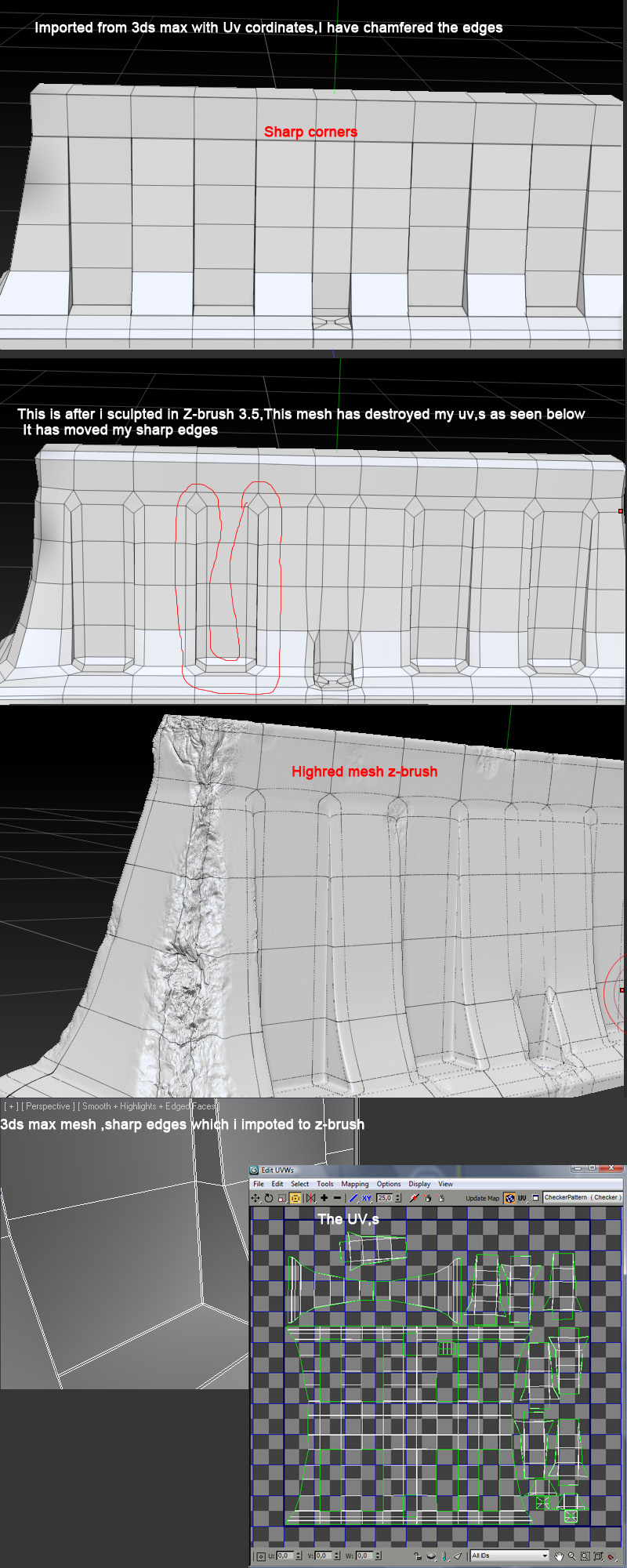
  • I have made a base mesh in 3ds max 2010,I have put an uv map on the model so the texture will look okay.look below in the picture where a took a screen of the UV map window in 3ds max.

  • I exported the model with Uv,s to an .OBJ file

  • Imported it to Zbrush and started sculpting,At the highest level i pushed the button STORE MT and went back to lowest subdivision,Flipped V and set the normal and displacement maps to smooth uv ,Adaptive and Tangent for normal map

*The maps was extracted and looks nice but after that :mad:

*I went to the highest subdev… again and decimated the model in zbrush
Exported it to Max and now all my uv,s are destroyed mostly where the sharp edges should be.

I have notice that if i import my model to zbrush,It has sharp edges,But if i divide it and go back it smooths my edges,I have to click “cage” but that only affect the model without any subdev… It doesn’t work at highest subdivision

I just want my normal map to fit the decimated model i exported from zbrush to 3ds max :rolleyes:

Is there any zbrush masters who can help a noob?In mudbox this is simple but zbrush is a different thing.

Thanks!!!

Attachments

maxissue.jpg

zbrushissue.jpg

Zbrush isn’t destroying your hard edges, it’s applying a smoothing algorithum to them…the same will happen in max if you give it a turbo smooth, mesh smooth, etc.

To fix the problem you can do a couple of things…which don’t require Zbrush. I find the normal map generation in Zbrush to be a little wonky most times. (the lack of a realtime viewer is killing me as well).

Anyway, you can decimate your Hires mesh down to a level that could be imported into another application (under a mill or so should be fine…depends on your RAM).

Then decimate one down to your lowres tri count (remember to keep your UV’s)

Import both of those into xNormal or any program that can bake down textures and bake them in there.

Yeah thanks

But i sculpted a mesh that is around 14 million polys,After that i apply a Hd divider so that normalmap/displacementmap i exported is extremely detailed and i wanted to use them for the gamemodel i make.

I thought i could do this without any external application becuse the problem has been that the decimate plugin didnt exixt before but now i should be able theoretically to make a basemesh with uv,s exported to zbrush,Detailed to around 14 million polys and much more with HD sculpting.

Then go down to sublevel 1 and export the maps.Go up to subdivision 7 again .clone the mesh so the HD sculpt disappears on the cloned mesh,Then decimate the model to around 3000-7000 polys and export it to 3ds max and apply all maps ?

I don’t believe you can decimate HD geometry. If you’re using that mesh for a game model you’ll never see all of that detail in the normal map anyway…unless you’re planning on using a 4k image for just that single object.

if you’re using a 1k image then you need around 1 million polygons to support the detail that is going to be able to transfer onto the map. 2k = 4mill, 4k = 16mill…etc.

Basically I’m saying you’re just wasting time and energy on a super high detailed sculpt that will never translate into the game.

also…if you’re doing a hard surface wall in Zbrush…turn off smt before you divide the object…that way it doesn’t distort your mesh and your UV’s won’t be effected anyway. It doesn’t help with your current problem, but in the future you shouldn’t run into this.

Thanks alot for the reply and explanation!!

Well the HD geometry is projected on the normalmap im pretty sure of,But when i then decimate the mesh i need to clone the mesh to get rid of the HD geometry otherwise i cant decimate the mesh as you said!

Is it unnessesery to project such detailed normalmap on a 2k sheet (normalmap) ?

Well i thought i could use this workflow rather then my old one which is -->

Made a basemesh,exported to mudbox.Detail the mesh and exported the highresmodel and a mediumres model.

I imported the 5-7 million heavy model to 3ds max and the mediumres model.

I used the polycruncher on the mediumres model to cut the polys down to around 3000 polys.
After that i applyed an unwrap–>peltmap and fixed the uvs!

i used the highpoly to project on to the medium(now lowpoly) model and exported all maps i needed via render to texture

What i mean is that i should be able to just use Zbrush for all steps beside the basemesh creation ?