ZBrushCentral

need help badly!

im really at a loss and i have no idea where to go from here. All I’m trying to do is to create a hard edge on an extracted piece of my model (i was also trying to create a hard edge on the model itself) but it keeps deforming and smoothing and warping no matter what brush i use. I tried using masks but it doesnt seem to help at all.

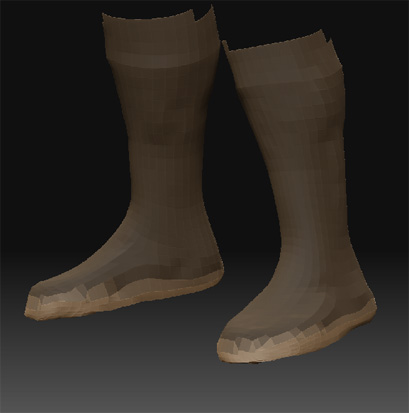
heres an image to assist anyone whom might help me. I just want to creat a hard edge for a boot in this example. But other times Ive needed to make a piece of body armour that fits tight or something, and i just want to make a hard edge but i cant even with alot of tesselation.

any techniques that could help me?

thanks for any help you talented folks can provide!

Attachments
helppick.jpg

this is really driving me crazy now, ive just spent the past 3 hours looking for answers but with no luck.

can anyone give me a hint? you dont even have to tell me what to do, just give me a link, a book, a dvd…anything.

i tried masking off the bottom off the boot, inverting it, and then using dam standard or pinch or something…nope the mesh warps and bends out of place, certainly doesnt look hard.

i then tried that same thing with lazy mouse and had the exact same problem.

At low resolutions, you need to follow an edge loop/poly line exactly if you want crisp edges. You can’t cut diagonally across polygons and expect to get a smooth result.

At high resolutions this isn’t an issue because the polygons are so small that you can’t see the jaggies.

But your model is a low res model so you’ll need to follow those edges if you want good results!

thanks!

but if thats the case then i may as well do it in maya? seems to me that it would be far easier to control edge loops at this mesh density it maya then in zbrush?

Also you mentioned that it can be done if the mesh is dense enough, well i tried that. but i still loose the flatness of the soul of the boot as i try to ‘draw’ a rim around the bottom edge of the boot. perhaps this is just me needing more practice :S

One way to keep the soles flat is to select those polygons at level 1 and then press Tool>Geometry>Crease. This tells ZBrush not to smooth the edges of the selected (visible) polygons when you divide. That keeps the edges much more sharp.

ah k, when you say select them, you mean using ctrl-alt and drag? like hiding and showing the mesh?

so i would ctrl-alt drag over the the base of the foot at the lowest subdiv lvl and so im only showing the base of the boot. then press crease, then unhide the mesh and click sub divide?

ill try it when i get home!

im thinking i might just try beveling the boot edges in maya before taking it into zbrush, see how that works.

Thankyou so much for your reply aurick!