How can i posible make rope/cable like this ??
[ ](javascript:zb_insimg(‘136770’,‘Rope_Reference.jpg’,1,0))
Please share some technique ?? or link for tutorial like I mean??
Thank’s before 
How can i posible make rope/cable like this ??
[](javascript:zb_insimg(‘136770’,‘Rope_Reference.jpg’,1,0))
Please share some technique ?? or link for tutorial like I mean??
Thank’s before
Please anyone give Your respond, thank’s 
Intresting task, here some tutorial for 3dmax, but how make this in Zbrush, must think
hi
you could model this in 3dmax and then import as a subtool
with “twist” you can create the rope an with “path-deform” you can bring it in position/form
if you want i could make a quick tutorial tomorow
bentrox,
for the model i’m currently working on here : http://www.zbrushcentral.com/zbc/showthread.php?t=69831
what i did was just use a generic cylinder 3x3y100z as a starting point. make it a unified skin so you can get it as uniform as possible. divide down 4-5 times.
use your layer brush set to zsub 15 strength and maybe 5-10 diameterwith a long lazy mouse tail set… start by on on side dragging diagonal lines from right down to left… make them as evenly distributed straight down the rope as possible… once you finish one side rotate the tool bout 90 degrees and continue the lines from each previous gouge down towards the next. Rotate the tool again to finish as needed… the result will look like crap at first but then you take out a standard brush with a bigger diameter and start tracing lightly over the gouges to puff them up… alternate smooth stroks and standard strokes and the rope should build itself up around the gouges…
once your satisfied you can use transpose master to bend the rope into shape without distorting the structure too much… if your not looking for detail that can be zoomed into 500X then this should suit your needs.
Thank’s for all Your help Guy’s
Thank’s Senzadread for the Link
Thank’s dapharmer I will try it
Thank’s Nossi, please make quick tutorial i will wait
hi
the quick_tut
[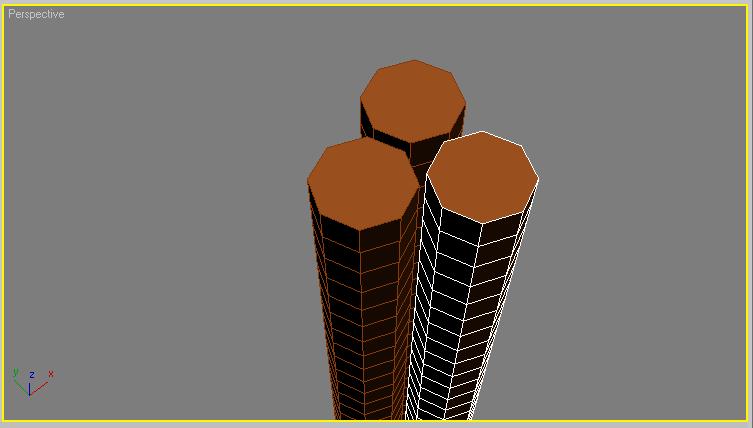 ]
]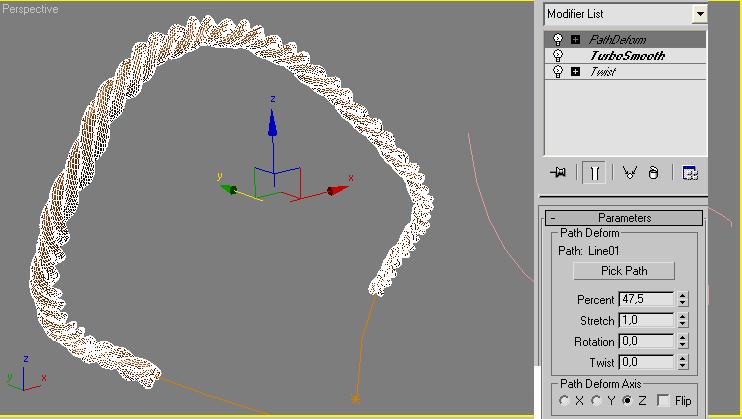
then create an line
select the twistet objects an apply the “pathdeform” modifier an pick your line
thats it
you could also first make a smal rope an copy them an thist them again
good luck
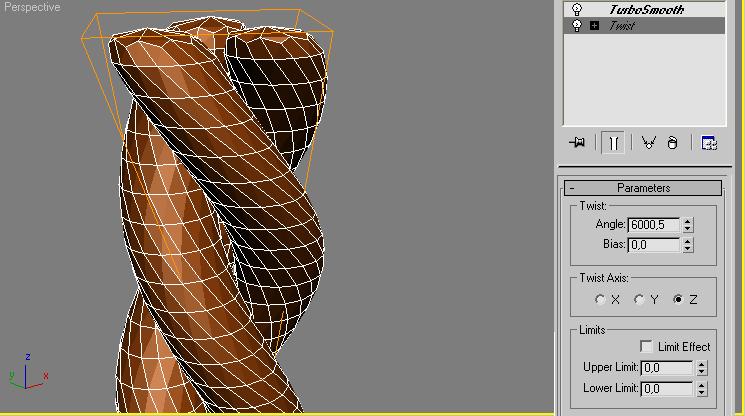
Thank’s for the quick tutorial 
GBU ^____^
need tutorial and displacement map for making rope, for more detail.
( in Maya )
Please someone help and give the tutorial in maya 
and the way to mapping cylinder with displacement map, and give the displacement map file.
mybe You know nossi ??
Thank’s
Super helpful, thanks guys!
