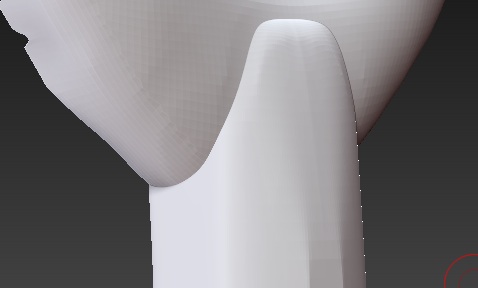
Newbie question: Creating an object by merging subtool parts. What’s the best method to smooth the join-area out to a seamless flow from one sub tool to the next? Any pointers to specific tutes would be great.
See attached image. I’d like to blend the ring part seamlessly into the stem.
I know that’s the general idea… Looking to benefit from an experienced modeller’s advice for the optimum way to do this. I’ll be following this technique quite a lot and would like to do it “right”.
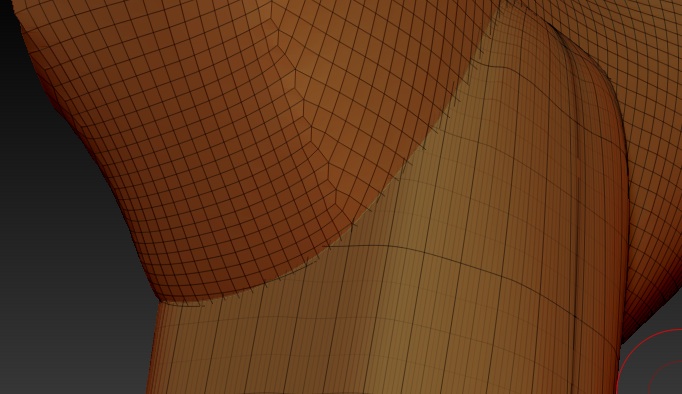
Here’s the polyframe - not the neatest and I can’t go over with the shooting to get a nice crossover curve.
Any advice out there or links to tutes that might address this?
Clay tubes. Lighty brush where they connect to get a seamless looking result. You’d have to be careful of smoothing though as this could break the seamless illusion.
Dynamesh. Will completely change the topology, but if that’s not a problem then this is a great method. Click a button and you’re done. It will give you a single solid mesh, which will let you use the smooth brushes, clay polish, etc to smooth the area as much as you would like.
Remesh + Project All. Similar to Dynamesh, but will work in older versions.
Retopologize them with zspheres. This could be a much slower process compared to the other 3 options.
Yep. Makes sense - but am I correct to assume theres no real way to get a seamless link with the mesh so I can run over the complete join with the smooth brush. That would just be magic if I could…
I’ve tried to go this route - but have not been able to convert to a Dyna while retaining my detail on geometric edges. It seems the Dyna is really for doing base meshes without limit and then you start sculpting into detail from there. Am I missing something?
Will give this a try.
Sounds interesting. Do you have a link for me to look into this solution more?