ZBrushCentral

Need a fix for Unified Skin

Hi folks. I wasn’t paying attention and created a unified skin with a problem in the hand. Please view the following image of the problem. I’ve hidden the different fingers to see how the polygons are joined.

entire_hand.jpg

Is there a way to join the middle and ring finger polygons, or delete them entirely and just model them back in? I don’t care if it’s a tedious process. I’m in a learning mode.

Thanks,
Adam

Just remodel the whole hand again with zspheres. but put the skin to 3 your fingers will not intersect but you will have a round palm of the hand, just simply used the move brush, use ALT and flatten it down. and its as simple as that :slight_smile: hope this helps.

Remodel or edit to taste in a normal polygon editor like Silo. You could try to retopo in ZB, but this will be time consiming and problematic given ZB’s tendency to turn low-side-count branching objects inside-out. Unless you’re pretty experienced with ZB’s retopo tools, you could end up spending a lot of time.

(If this was my project, I’d just jump into Silo and correct.)

-K

yeah, it is the well-known zbrush prob.
maybe i would try to connect a new zsphere for the finger…
or retopo directly should work fine.

look on the pixo-site after the downloadable help-file.
in it you will find a nice tutorial for hands with zspheres

Wow, you live in the exact same place as I do and I had the exact same problem with the hands as you :eek:.

I would recommend trying to replicate this, it’s very helpful & easy.

http://www.highend3d.com/zbrush/tutorials/modeling_zspheres/Quick-Basic-Hand-and-Finger-Tutorial-263.html

As people are having trouble with this i put this together.

Here this is my first tut so sorry about the quality.

Hand Tutorial Here

Hey, thanks for all the help, everybody. I’ve definitely got some reading to do.

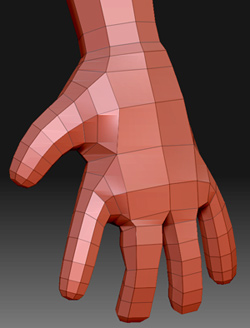
For now, I’ve just brought the model into Cinema 4d and fixed it there. Here it is back in ZBrush, waiting to be touched up.

[entire_hand_fix.jpg]

Thanks,
Adam