Sorry, I deleted all files!
With new downloaded files, zBrush crashed at startup.
The “NickTools Data” folder has the same content I downloaded before installing.
With the previous version I can start zBrush and test it again 
Sorry, I deleted all files!
With new downloaded files, zBrush crashed at startup.
The “NickTools Data” folder has the same content I downloaded before installing.
With the previous version I can start zBrush and test it again
The Hide subtools options are very useful. Thanks for the updates!
This plugin is really useful thanks.
Hi Nyx702, just real quick (for now, I visit so many posts up here with such cool art like yours)… real great artwork you produce. I have viewed most of your art and it’s all excellent, but, I mainly liked your MECHA TANK (did you ever finish that one i.e. polypainted?) and believe it or not, the gun for the girl with the armor suite. I REALLY like how that weapon turned out. You most certainly inspire. Draw on my fellow artist, draw on (or should that be sculpt or both?)
I have implemented a Quick/Iterate Save feature as requested by someone on Polycount. Svengali has made a great QuickSave plugin but I wanted to try my hand 
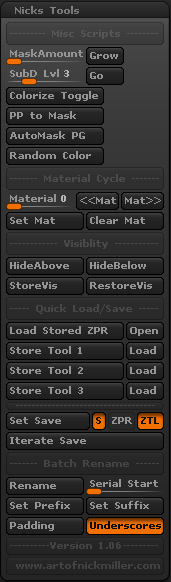
Sorry. No Gif for this. Should be pretty self-explanatory.
To start the “Iterate Save”, first chose or create a file with the “Set Save” button. In most cases you will be choosing the file you already have open however you can create a new name for the iterations if you wish. Then whenever “Iterate Save” is pressed a copy of your current tool will be saved. You can hotkey this button to quickly save.
If “S” button is enabled the original file will be overwritten too (on by default). This works for both Ztools and Zprojects.
Don´t work on mac. Crashed at startup!
Same behavior like the previous plugin release on mac os x 10.6.8.
I take the previous, previous version. This version is running!
Hope you fix it soon for mac!
Thanks very much Nick!
plugin all always welcomme and your’s look good thanks
Your plugin is amazing thanks.
The older version works great for me on the Mac but the new ones crash ZBrush on load  <style id="_clearly_component__css" type=“text/css”>#next_pages_container { width: 5px; hight: 5px; position: absolute; top: -100px; left: -100px; z-index: 2147483647 !important; } </style>
I got ahold of Marcus here and he figured out why it wasn’t working on a Mac. We should have it working on Mac’s plus some new scripts very soon!
Update!
I added a few Miscellaneous scripts and I made a new sub-section for the new SubD related scripts. A couple bugs were fixed. A UI issue that caused buttons to overlap and something that was causing the batch rename Set to store incorrectly.
And probably the biggest fix for this update is, thanks to Marcus, it now works on Mac! Go Marcus!
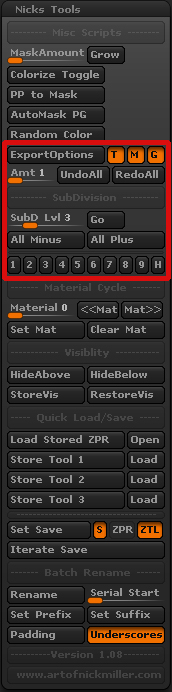
New Features
ExportOptions: This script will toggle the Subtool Export Options, Texture, Merge UV Cords, and Sub Group, for all your Subtools. This is a minor annoyance but with large/many subtools Mrg UVs can be time consuming and has been known to crash Zbrush.
Undo/Redo All: These buttons will Undo or Redo multiple times on each visible Subtool. How many times the script Undo/Redos is based on the “Amt” slider. This is perfect if you want to Undo actions that happen to all subtools such as Decimation.
All SubTools to SubD level: this script is the same as it has been in the past however it is now used with the “All Minus” and “All Plus” buttons.
All Minus/Plus: These buttons will go up or down SubDivision levels for all visible based on the SubD Lvl slider. If the slider is at 3 then pressing “All Minus” will take all your subtools down 3 SubD levels from their current.
1-9 buttons: Pressing these will put your SubD level at the number indicated. Ideally these would be hotkeyed for quick SubD level changes.
H button: Puts the active subtool at the highest SubD level.
Thanks for useful plugin and the new mac update! Work fine on OS X now
best regards
Shoot! I forgot to mention a feature!
With the 1 thru 9 buttons. If you mesh doesn’t have SubD levels, pressing one of those buttons will divide that many times. So if you press “5” it will be like essentially pressing “Divide” five times.
Thanks everyone!
hope the autosave works ;D
Thanks for sharing your ideas Nick!
But… there is no way at all to place underscore into subtool title instead of copy/paste the right name? It is sooo strange because Remesh operation or making skin from zSpheres places “Skin_” before the name of subtool. And you can’t stay consistent with naming convention…
I am not exactly sure what you are asking.
But I do agree its weird that Zbrush doesn’t allow Underscores normally. If there was enough interest I suppose I could make a “Insert Underscore” button that would add an underscore for you.
Batch rename works perfect! And I have only two things to ask for Pixologic to do:
allow underscores and
include your plugin with default installation of ZBrush as a “small annoying things fixer” thats all)
Thanks again for useful scripts!
@LoveNpeace: Thanks! Glad it’s working for you. I agree! It would be amazing to be included in the plugin package.
Update time!
Just in time for the holidays. I have made a few new scripts as well as tweaks to others. The biggest addition is probably Smart Dynamesh. An edit to note is that the “AutoMask PG” button is now a toggle. Before you could not tell if AutoMask Polygoups was on or off. Now you can. It shouldn’t cause any problems if you have it in your UI.
As Always let me know if you have any problems or have any ideas for new scripts. I realize the menu is getting pretty long. I may add some sub-menus in the future updates.
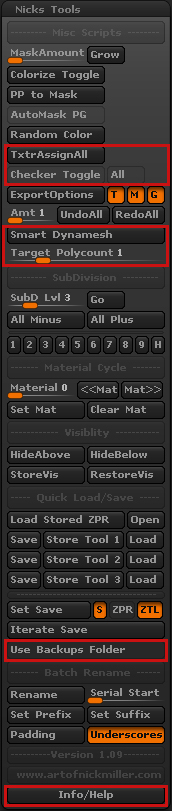
New Features
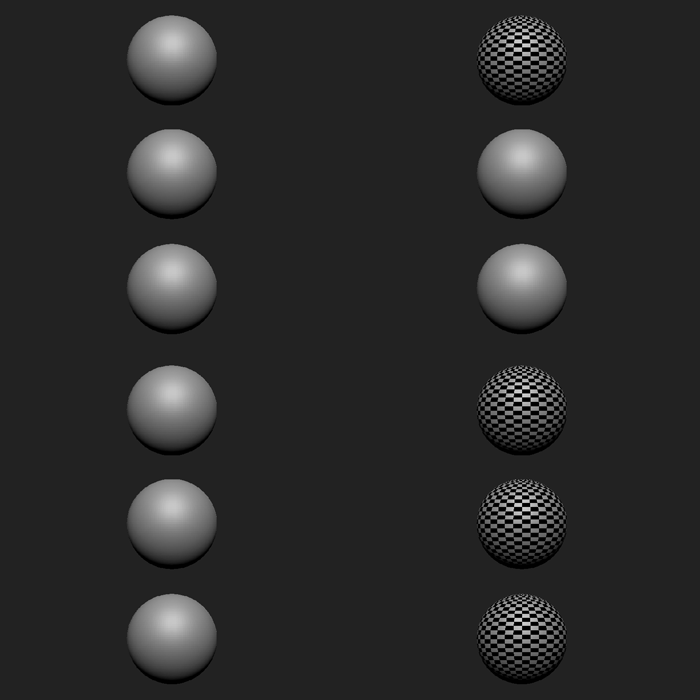
Use this script instead of initially pressing Dynamesh then just Dynamesh as normal. This script is also great for reducing the polycount of your Dynamesh when the mesh gets too heavy. Reducing the polycount this way has very little detail loss.
Target Polygoncount: Slider used for the Smart Dynamesh. Number is in Millions.
Use Backups Folder: If this is enabled all the files created with “Iterate Save” will be put into a new folder called “Backups.”
Info/Help: This button will take you to the plugin’s homepage (my website). There you can check for updates or lookup how to use a particular feature.
I couldn’t wait! Thank you man!