ZBrushCentral

My own brush menu?

Is it possible in ZBrush 4 for me to make my own brush menu?
I always expand the empty space on the left of the interface and drag the brush menu over there, but then I always have several brushes there that I have no plans on using. So it would be cool to be able to make my own menu, even if only on a temporary basis.
Naturally, it would be even more cool to make menus that could be saved and loaded.

Thanks. :slight_smile:

I don’t think so. You could do a custom UI and have all the brushes you want along the bottom (as an example) then go to Preferences > Config and Save UI.

I didn’t think so either, but figured I would at least ask, so thank you for the reply. :slight_smile:

I think I’ll try what you say though and see if that works out as a partial solution.

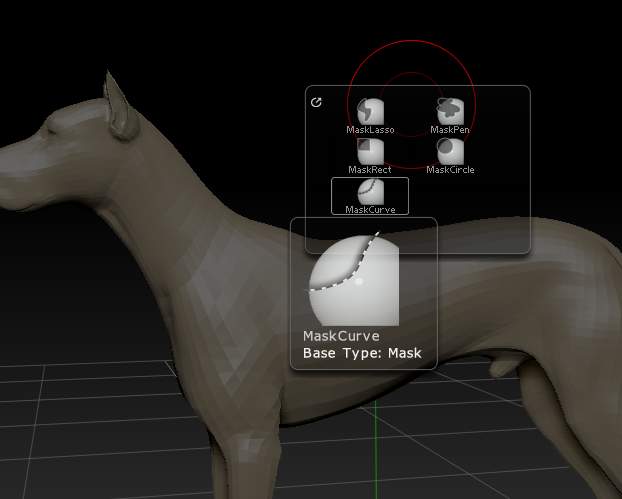
Yes, you can do it. Here’s a pic of one with Masking brushes on it.

[attach=224280]Custom_menu.jpg[/attach]

I’ve assigned a hotkey to the menu so that it pops up at the cursor. You can read how to it here, but do take note of starting the name of the menu with a “~”. This just avoids an annoying UI display issue:

http://www.pixologic.com/docs/index.php/Changing_the_Interface_Layout#Building_User_Menus

Attachments

Custom_menu.jpg

Wow thank you marcus, I do appreciate that! :slight_smile:
I’ll go study that page soon as I can.