ZBrushCentral

Multiple UV ranges in Zbrush

Hi there;

I can model from scratch in Zbrush using Zspheres or something else…, now I can create UVs for that object with AUVS for example…, but these are created in the 0-1 UV range.

Can I create UVs with the AUVtile button on, say, three different UV ranges (0-1, 1-2, 2-3?.

Thank’s in advance.

don’t believe you can, but aurick will probably call me out on it if I am wrong.

ZBrush maps exclusively within the 0,0 to 1,1 range. If you need more UV spaces, then you’ll need to export your model and use a different mapping method. You can then import that back into ZBrush.

Thank you for the info.

That is the method I’m currently using, but there are some artifacts in a particular mesh that appear if I do that.

If I map it with AUVtiles inside Zbrush and export the displacement map it works great. But if I do the same but I then export the model and scale the UVs to fit in 4 UV regions for example, then some artifacts come up and I don’t know why, it’s quite extrange…

I want to use multiple UVs because, you know, a 4096 pixel 32 bit depth displacement map weight something around 200 Mb, So I’d wanted to use several 1k or 2k maps instead (weighting something around 30 or 60 mb, wich is more manegeable).

Thank’s again.

You’re scaling Tiles mapping onto multiple regions? That would be a problem. Tiles mapping is calculated for the specific texture size that is assigned to the model when the mapping is assigned. You are likely to get artifacts if you then modify those UV’s or use a different sized map than the one that was calculated for.

Even if I’m scaling those UVs proportionally?, hell, that’s a problem.

So, are you telling me I can AUV my object only in the 0-1 UV range and I cannot get more UV ranges in MAYA in order to get more resolution? :angry:small_orange_diamond:roll_eyes:

You can offset your UVs in Maya so that you have different UV tiles U 0-1, 1-2, 2-3 and so on. You’d then assign Tool>Polygroups>UV Groups ins ZBrush for creating textures.

Yes, I could do that, but by doing that I don’t get more texture resolution, to get that I need to be able to scale UVs.

No, you can resize the shells, so long as you stay within the UV unit limits (so normalizing the UV coordinates would bring them into the 0,0 to 1,1 range).
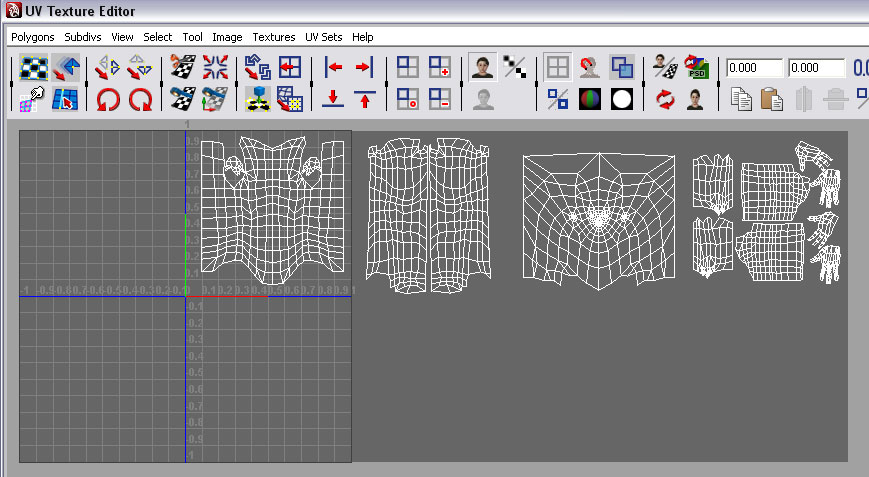
MultipleUVs.jpg

The Multi Displacement 3 plugin will output displacement maps for all tiles automatically. Although it can cope with some in the negative range, it is best to offset by positive U - the maps are then numbered sequentially starting with 0 for the 0,0 to 1,1 range.

EDIT: I don’t see why you shouldn’t do this with AUV tiles from ZBrush but you will need to split the UVs in Maya so as to offset them. I would scale them down slightly too, so as to fit inside each range. For the reasons that aurick mentions above, I would assign UVs with a 4K map when you intend to output 4 x 1K maps.

Ah, So is it best for me to make AUV tiles for 4k in order to be able to scale them in MAYA to fit in 4 UV regions?.

I don’t know where I tell Zbrush to make tiles for a 4k UV space…, but I’m sure it is well described in the documentation.

Thank’s for the info guys.

You create a new blank 4k texture before assigning AUV tiles.

I should point out that I’ve not heard of anybody using AUV tiles in this way, so I can’t vouch for how successful it will be, simply that I can’t see why it shouldn’t work. Usually you would use Maya or another UV layout program to do all the UV mapping if you wanted multiple UVs.

Yeah; as Marcus says, I cannot recall AUVs or GUVs being used as 0-1 shells; however, I posted this here some time back:
http://www.pixolator.com/zbc/showpost.php?p=427154&postcount=5
Hope it helps some :slight_smile:

These guys have useful UV scripts & info also:

http://www.highend3d.com/maya/downloads/mel_scripts/modeling/misc/uvIsland2selSet-mel-4603.html
http://www.highend3d.com/maya/downloads/mel_scripts/interface_display/nm-UV-Set-Manager-4979.html

and perhaps try: UVAutoRatio 1.3.5 for uniform scaling of UVs:
http://www.highend3d.com/maya/downloads/plugins/modeling/poly_tools/UVAutoRatio-4774.html

Chris (someone :wink: )

Thank you for those tips.

The UVRatio 1.3.5 looks very promising, I’ll be testing it. :slight_smile: