ZBrushCentral

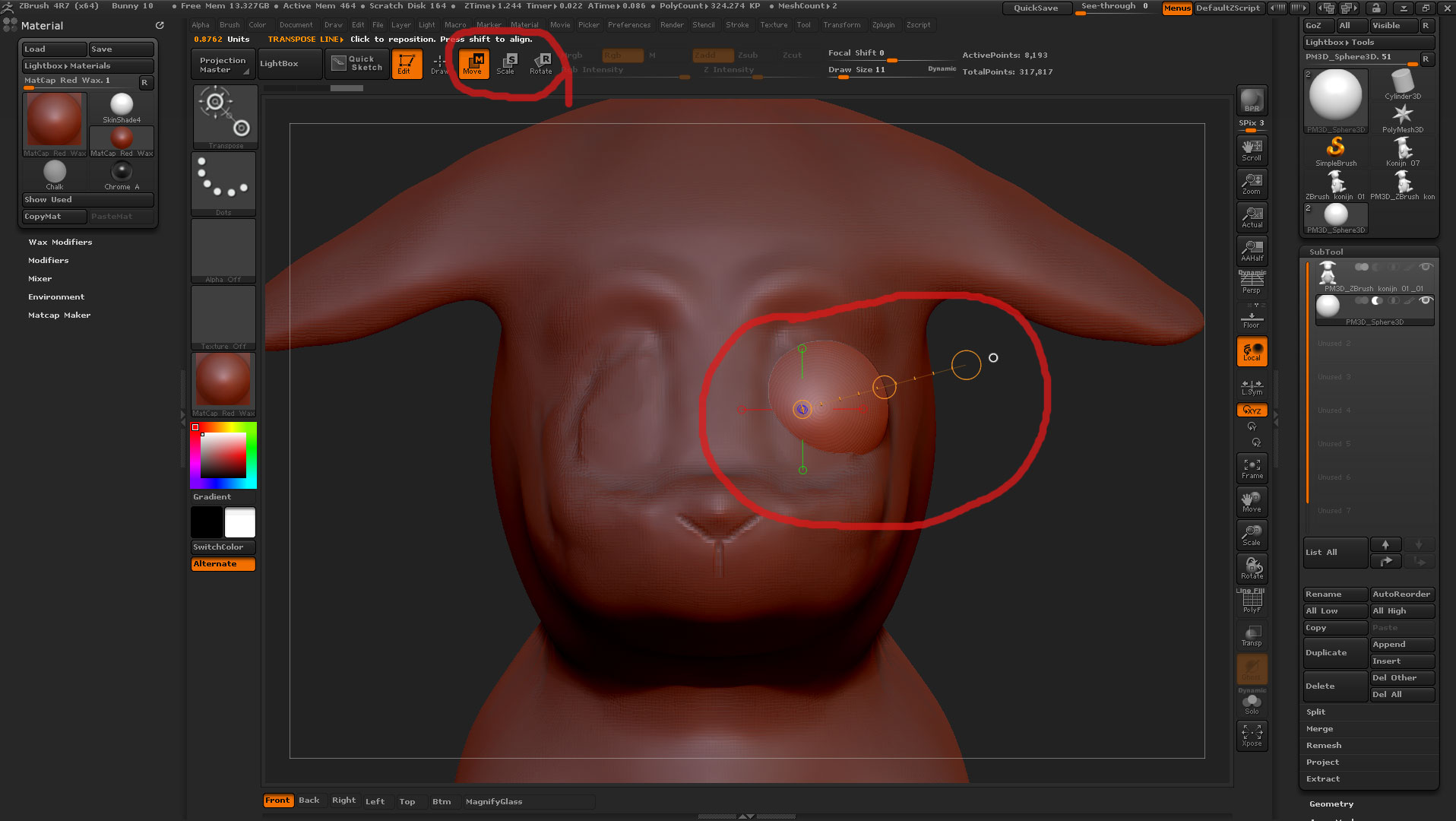
Move Scale Rotate

I managed to add a sub tool for the eyeball and even managed to size and move it where I want it, just luck. But ……
Can somebody advise me a tutorial on these weird circles showing up ? Can’t find nothing about it.

Before I bought Zbrush I asked for a trail version but ZBrush does not release a trail version. The more I am trying to learn this program, the more I understand why.

Attachments

MSR.jpg

http://docs.pixologic.com/user-guide/3d-modeling/posing-your-model/transpose/action-line/

Thank you, thank you, thank you.

I’ve seen this macro before But I am scared to death to experiment with it. Is it going to explode ? :smiley:

Seen this Macro? What explode? I’ve uploaded a bunch of Macros as well as Custom startup and Custom UI’s. I changed the UI so it made sense to me and gave me the functions I used where they are easy to access. As long as you download and install all the files into the correct locations, there shouldn’t be any problems. I’m on a Windows 7 Home Premium.

Yes, you have posted it to me many months ago. I hope you have success with your macro. For the moment I even have no idea what these buttons are for.

For the moment I am seriously pissed off. This program is a joke. It is full of booby traps, barely impossible to navigate and it calls ‘cats’ ‘pigs’

All of the sudden it jumps out of edit mode and it starts to draw rabbits and I have no idea how to get out again.

Move = m man and scale = s

Who the hell wrote this manual ? “You can press “W, E or R” on the shelf.” KEYBOARD man. Is it really that difficult to be understandable for you guys.

Is it really that difficult to zoom with the mouse wheel ? Click the MMB to rotate ? Shift + MMB to pan ?

Look at this website, man seriously, it is as complicated as the program. Being user friendly is not an option for Pixologic.

Sorry about this sir but I’ve got to get it out of me. I have this program for more than a year now and so far I haven’t discovered anything Blender does as well. Maybe I am more mad at myself to have flushed 700 box down the toilet for a Blender clone.

This programs sells good because it carries the name Pixar and everybody wants to howl with the wolves in the woods.

Everybody wants to ride a Mercedes, just because it carries the name Mercedes. A Lexus is a good as a Mercedes but it carries the name Toyota.
I understand your frustration. You have looked at http://docs.pixologic.com/reference-guide/interface-overview/ ? Do you have all 3 patches? Some of my files have been downloaded by ~160 people, some of the images showing the stuff around 1000. Guess some people liked what I’d done and used as is or as a starting point for their own. Don’t give up.

Zbrush has been build from what was a 2.5 program for 2d painting. Instead to change the interface the features have been added over the top. This is certainly not an intuitive interface and there is little you can do in a intuitive way. It is simply not possible to learn it simply guessing what each tool does. A lot of simple actions need to be read or told before to be able to understand them, for example the transposer. Mudbox has a interface a lot more logical and easy to learn. But apart of bitmap painting, Mudbox is miles away of the power of Zbrush. And simply there is not other software that can be consider a serious alternative. This means that if you want to be able to use the best 3d organic modeler it is needed to be challenged by a difficult interface. A lot of people has done it as it demonstrates the numerous excellent 3d sculptures of this site and the fact it is the industry standard. One simply wish that they could focus more in the next iteration in interface and inconsistencies rather than only features.

Within a year I will probably talk different, for the moment I’m dragging myself through the learning process.

Thanks for talking to me guys.

I don’t consider myself a beginner or an expert and for me is also confusing the transpose .The way how interacts with axis and axis of symmetry is rather convoluted. Place and scale a ball in a socked is unnecessarily complicated.
In early stages it is more convenient to get a beginner video tutorial and try to reproduce step by step what they do instead to create new content based in guessing because the roadblocks are continuous. Even if Zbrush has a context sensitive help this doesn’t apply to actions and interaction.