from the zbrush screenshot, you can see his tail is not straight. 
Brilliant
Top Row bound, though IMHO he gets a little lost in the black background…
[attach=244091]pic1.JPG[/attach]
My friend,I very like your work so I spend few minutes on your picture,What do u think about that?It’s only my opinion~;) Good work!
Attachments

Thanks guys.
Yea the more i work on it the more i think i need a better background. I was thinking he was sitting in the dark. But I think you are right. I haven’t come up with any idea about the background yet. But definitely need to think about that. Thanks.
Hi buddy, I liked the change on the boar skin and axe blade. What did you do?
Hi Devans_87,
I studied your paint over in photoshop and now I can see some of your changes especially on the axeblade. I still like the leather to be a bit desaturated and not so hot looking. But I really liked what you done on the other parts. I am not very good at painting but here is the result what I tried after saw your changes. let me know what you think. thanks.

Really really great!!
other views to show all model!!
Congrats
Hi arthurduque,
Thanks. I will render out some FG pass from other view to post. won’t have time today, but I will post sometime tomorrow.
HI~your work looks better than before~:D
First,sorry for my poor english!
I’m glad you accept my advice.Your first render looks a little flat,some parts looks dark.U know,we need some highlights in your picture. (
(
And optic centre?)
The hot looking leather I mean that u can change the color.(May be green?blue?you can try to do it.)
And now you need a better background,it would be wonderful!
No other advice I’m only a new member of this big industry U know.:o
Keep it up!
hi, buddy,
Really appreciated your inputs. My english isn’t great either.
I actually started messing around with some background stuff. And at the beginning I didn’t feel that I need depth of field in, but now I think i need. I am working on this. and will post after I get it done.
Meanwhile, I am posting several AO render to show the model from couple different angles.

Attachments


[This is great!
can you share your Nuke comp tree please?
specially the part with the SSS (was it a plus ?
Hi ashaiad,
I did the way Ben Neall talked about in his gnomon dvd, he demonstrated in shake, i just did the same thing in nuke as the following:
invert the SSS pass and multipy on top of the diffuse pass and then plus the original SSS pass again. I will take a screenshot of the nuke when i have time, don’t have nuke around here right now.
I have seen another way to composite SSS as the following (it was using the SSS fast, not skin fast so there is a bit difference):
render out front scatter and back scatter as seperate pass, then screen both of them on top of diffuse. maybe with skin fast, you can render out the 3 layers and screen them, i am not too sure. You might want give it a try.
alright, here is the nuke screenshot of the SSS pass part. I added a grade so that I control how much SSS will be in.

Attachments

Wow, absolutely amazing!
TOP ROW! FANTASTIC WORK… 
Awesome art work. I like all the models. you have done a perfect job.KEEP IT UP!
Thanks guys. I really appreciate all of your comments and I wouldn’t be able to improve the image without you guys. Here is a image shows how this image evolved.
[attach=244492]boarchanges.jpg[/attach]
Attachments
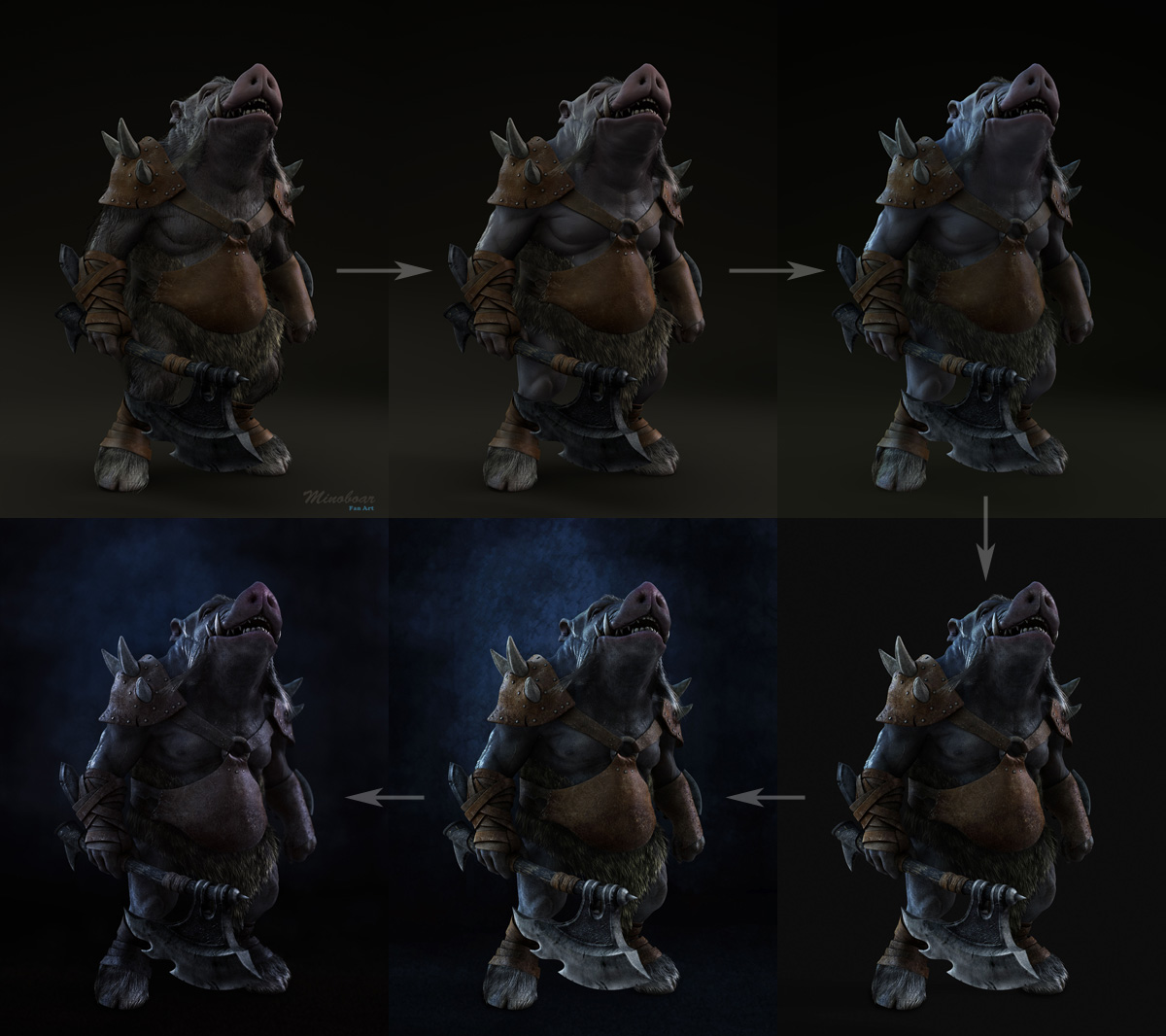
For this last update. I did a little bit tweak: darkened the highlight on the left index finger knuckle, lightened up the ground a tiny bit and added more influence color into the gears and weapon. I am debating whether I added too much color or not, hopefully you guys can point out something. Thanks.

He came out really well. Very solid looking.
thanks. I tired to paint some drool in photoshop, didn’t get what i want. I am going to try the 3d method.