From my understanding so far, the only way to adjust the distance between objects is as follows:
To define the distance between each inserted mesh, use the Stroke >> Curve Step slider. A value of 1 will touch each inserted mesh to its predecessor. Lower values will cause the inserted meshes to overlap while higher values will separate them from each other.
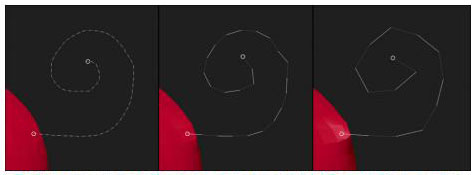
However when you do that you get a curve that looks like this:
The Step setting with three different values from left to right: 0.1, 0.5 and 0.9. The lower setting create smoother curves but more points.
And so it seems there is no way to get a smooth curve and insert less mesh along the curve.
The Curve Res in the Brush Palette does not seem to help.
How do you maintain a smooth curve and control the spacing of the mesh that is inserted?
EDIT: Ah OK… I forgot about Brush Draw Size. That solves it. Sorry…
NO. What was I thinking. That does not solve it.
So this is still a problem. There seems to be no way to control the spacing of insert mesh (and size) along a curve independent of the curve resolution. These need to be independent some way.
Any answers?
Attachments