ZBrushCentral

mesh ok when projected, but mess when ...

i have an strange problem i cannot solve…
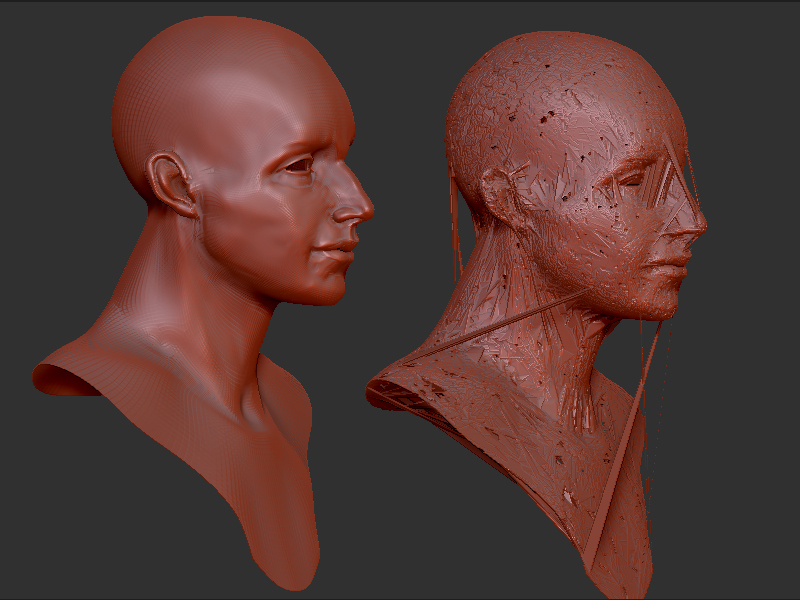
below you see left a mesh i obtained from projecting another mesh onto this. it has 4 subdivisionlevels and looks just fine. the projection when fine, and captured exactely the original parts i wanted…
now, when i put the subdivision level to 1, and then again to level 4, the result is what you see on the right… ??? and, when looking inside the mesh the mess is even worst … ??? so, it is no longer workable with subdivision levels. how can i fix it, or avoid it ??
i have latest zbrush…

Attachments
zbrush_problem.jpg

go to your highest SubD level (the one before it goes all mush).
Delete your all your lower subD level.
reconstruct your lower subD levels.

ok, i tried…it does not work, since i now realised the mesh is already when i put from level 1 to level 2 (not only4). so only level 1 looks ok.

i see i misunderstood your advise…have tried again…yes, it works partly. i get now 2 subdivision levels, but i have lost the topology i had created. the recalculated toplogy is not what i want, it has not the edgeloops i made, and the first level is now way too many polygons… anyway, thanks for helping. this way the model is still usuable at least. thanks.

edit : ahhh one has to press recalculate subd several times… now i am happy !! thanks a lot !!!

happy you got it working.