ZBrushCentral

Mesh gets 'pinned' when smoothing

Hello,

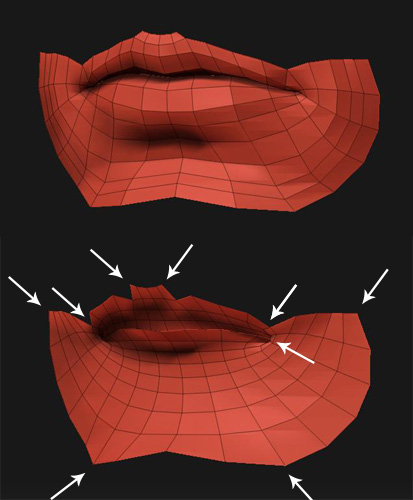
I deleted everything but the mouth from a head. Now I want to smooth everything to the maximum (I just want to do it, don’t ask why). However, it seams as if the borders points are pinned to their position when being smoothed. This leads to a strange result especially in the mouth corners.

I double checked that my whole mesh is visible, there are no more parts hidden. They are deleted now. What am I doing wrong?

[ATT=]zBrush_pin.jpg[/ATT]

Patrick

Attachments

zBrush_pin.jpg

Hi,
looks like the outer edges are creased,so just remove the
creasing and you should be fine.

That’s what I also thought at first, but no, that’s no it.

It only appears at the border where I deleted the mesh previously (I also deleted the inside of the mouth). The original mesh smoothes as it sould smooth. I exported the mouth as obj, checked it in my modeling program and imported it back in. There is nothing wrong with the mesh, at least I can’t find anything wrong. Strange…

Patrick

Seems i was a little hasty with my above assumption and
i apologize for that.
Some tests later i think it’s just the way subdivision works
in ZB,the mesh shrinks and the corners stay sharp.If the
borders are creased the mesh keeps it’s size and the
corners round off slightly.
Depending on what you’re after you could try the move brush
to get the desired effect maybe.
Good luck!

You don’t need to apologize :slight_smile:

I also made some tests with the DemoHead and it seams that this is the way it’s supposed to be. That means I have to close the mouth.

Thank you for your time.

Patrick