I notice that you can’t Mesh Extract by Layers anymore because the Make 3D button in the Layers palette is not there in ZBrush 4. Is there a workaround for this or has it become replaced by something else or is it just an obsolete function. No biggie!..just curious.
Im am looking for this very function and used it all the time in 3.5
I’d just found myself wanting to use it and realized that it isn’t there. I looked through all documentation and nothing about it being removed. The new doumentaion has the new funtiosn for 3D layers but does not describe the ability to make 3D objects from the layer. I liked the funtion…I hope it is there or something better at least.
Looks like you’ll need to store morph targets from your layers then create a difference mesh in the Morph Target palette. Should give you the same effect, just an extra step.
*edit: I just tried it and it doesn’t work the same way. You do get the difference, but you don’t get thickness (shell) on the mesh it produces.
@ Extra Dimensional
Actually, you do get thickness but it’s just not a good result (crappy edges)
I tried it and I agree…the effect is not as good. The edges are crappy. Any other suggestions? There must be an answer to this…I hope. 
Ok…good news…The Morph Target CreateDiff works. There is one plus one more extra step that needs to be done. When you create the diff tool you will notice that it has a cap on the back side. What you see is a solid piece as you rotate. These come in with Polygroups allready assigned. The following is what I did to make the piece end up with a nice edge.
Please try to replicate this to validate my claims. Thanks…
- Delete the surface you dont want by turning off that polygroup.
- Go to “Delhidden” under the “Geometry” panel and delete hidden.
- Go to SubTool menu at the bottom where “Extract” is located. Adjust the thickness, E smooth, and S Smooth to your desired settings (Just like you would for the Make3d under 3.5 layers.)
- Your new geometry with nice smooth edges shows up as a subtool underneath the original.
What I suspect:
The sofware doesnt recognize the Smooth Edge command routine when more than one PolyGroup is present. this could be a bug.
There you have it. 

@ NdeSomov
Yes…that does indeed work…gets rid of crappy edges…but you still can’t make 3D from layers …that I know of.
@ Pixologic…shouldn’t have the ‘Extract’ button description been changed for version 4?
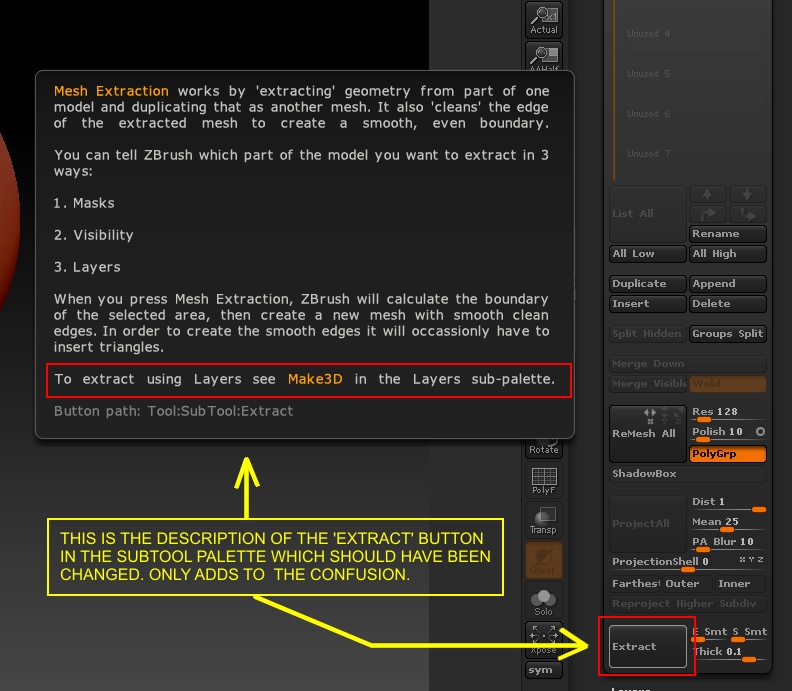
My description for using the extract button is to make 3D from layers. You can read a little higher on the thread to see what was talked about.
Make your layer detail then morph target then…Create tool with Diff option…
then…
The Morph Target CreateDiff works for converting a layer detail into 3D. There is one plus one more extra step that needs to be done. When you create the diff tool you will notice that it has a cap on the back side. What you see is a solid piece as you rotate. These come in with Polygroups allready assigned. The following is what I did to make the piece end up with a nice edge.
Please try to replicate this to validate my claims. Thanks…
- Delete the surface you dont want by turning off that polygroup.
- Go to “Delhidden” under the “Geometry” panel and delete hidden.
- Go to SubTool menu at the bottom where “Extract” is located. Adjust the thickness, E smooth, and S Smooth to your desired settings (Just like you would for the Make3d under 3.5 layers.)
- Your new geometry with nice smooth edges shows up as a subtool underneath the original.
