ZBrushCentral

mesh artifacts

Hi,
i have a problem with my mesh.
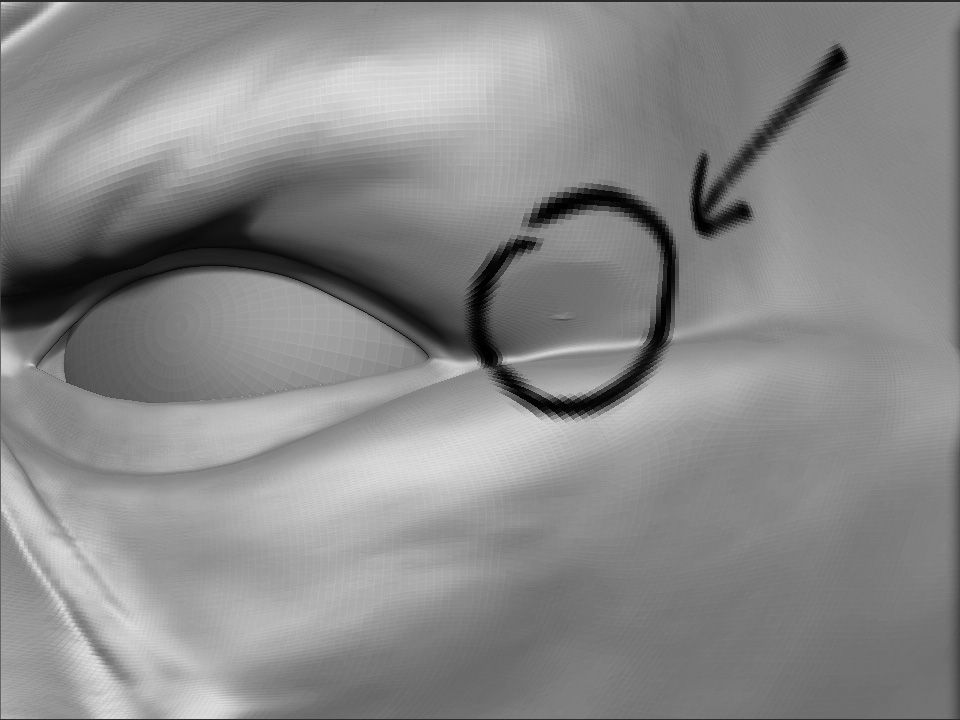
i dont know how to realy describe it, but when i smooth my mesh at some parts of the mesh i get this artifacts (pic1). It seams that this point gets smoothed in the wrong direction or with a different value. Anybody know how to fix this ?

thanks,
Sticky Fingaz

Attachments
ZBrush Document.jpg

yep. she’s borked. we can only hope they intend to fix this in the next release

http://www.zbrushcentral.com/zbc/showthread.php?t=66435

Flaten brush won’t help?

It’s the incidence of POLE, meeting of five or more edges in a vertex. Actually that’s one of the reason why I prefer ZSphere sculpting to basemesh sculpting. Clay bruish may deal with it. If you ZSub the area, and fill the hole with ZAdded clay, you may smooth the neighbouring area. I don’t know if it helps…

yes they’re poles. poles that smoothed fine in zb 2. that smooth fine in mudbox. maya. silo. . . a fundamental topology structure of poly modelling. let’s not propagate this culture of the workaround. the flatten brush will smack the spikes down but soon as you hit that area with something else they’ll pop right out again. tiptoeing around those areas is not prefered. it’s a ****ty ****ing bug. let’s let them know. let’s HOPE they fix it in the next version

It is a known issue, and it is being addressed. Please don’t smack down someone who’s trying to help an artist get around the issue in the current version.

was certainly not my intention to disrespect any ZBCer there. if it appeared so i apologise

it’s good to hear you guys are looking at this issue. that’s the kind of communication that goes a long way to ease the minds of those frustrated by bugs such as this. thanks for letting us know

Wow, I am glad you guys reported this. I thought it was just me. This fix will really improve my models and make me feel better about myself too :wink:

When I get a spike I usually go from Lv1 upwards, using the smooth at each level to smooth it off. Also you can always export a higher level as and obj into max or maya and deal with it that way and export it back in.

since 3.5 is ??? moons away it’d be great to hear ANYTHING from the dev team ( outside of code related issues ) as to what might be causing the spikes. that we might troubleshoot our meshes. since it isn’t all poles in all meshes that it’s happening. why some are fine. others not. even the broadest brainstorming shared from their end might be useful

Thanks all for your workarounds. I too thought I was going crazy, changing my topology over and over again, to get rid of those artefacts.

I hope the update will be available soon, because right now I can’t really use Mudbox (which handles poles just fine but is just a bit too slow) or ZBrush. I’m using the smooth brush a lot. Would be very tedious to fix those artefacts every time…

According to Matthew Yetter from Pixologic support this will be fixed in version 4. Mac users already have it fixed. Lucky guys…