ZBrushCentral

Menus problem

I upgraded to 4r3 and now my menus are screwed. How do I re init ZB, not just the layout, the whole deal. Any ideas?

Its just this menu, all the others work as normal. I did click around to see the UI changes in this release now I cant access my pref pallette… Arg.

Attachments
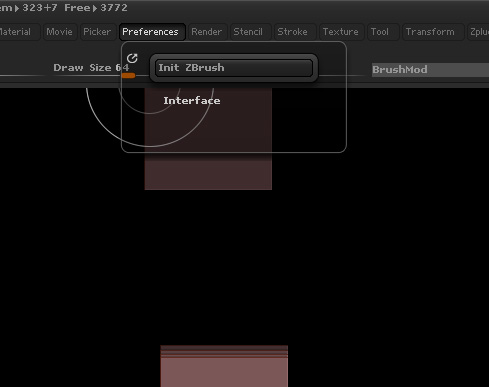
Untitled-1.jpg

obviously I have clicked init zbrush several times, which doesn’t seem to reset it to how it was when I loaded it up.
Its absolutely infuriating. I literally can’t get into preferences. When it occaiaionally lets me into the Interface subpallette, i cant get into the config subpallette to save it, they literally disappear.

any help appreciated.

I dont want to have to do some clucky mylti upgrade install to get it back. … 4 … R2 … R2b …R3… arggghhhh

If you can access your ‘Interface’ submenu, go in and make sure ‘SubPalette Popup’ and ‘Palette Popup’ are turned off. Once they are turned off, close ZBrush and restart it. Other than that, I don’t know what to tell you except maybe start a support ticket.

I can change those toggles, but when I finally get into the interface section I cant get into the config section to store the config. Even so it doesnt change the behaviour.

Isn’t there a Zbrush config file I can manually delete, that will be remade on start up?

  • how do I start a support ticket? Noob question I know…

Go to Pixologic Support page and log in, then click ‘Submit A Ticket’. If you haven’t registered, you will have to do that first. You will also need your purchase information.

Did you try the ‘Load Next UI Layout’ buttons?

new UI.JPG

ctrl mouse over “Store Config” button, which tells you what the config file is called.

In ZStartup folder the is a cfg file called “CustomizeUserInterface.CFG”. Shut down ZBrush, delete the file, restart ZBrush.

Thanks for the input though!