ZBrushCentral

max2008 UVW problem

i started in max and made a base mesh which i then imported into zbrush for sculpting. after i finished, i exported the lowest subd level back into max to UVW map it. when finished, i reimported the the obj with the uvw map back into zbrush as the lowest subd level again.

the problem is when i go back to any of the the higher subd levels, it looks as if a whole lot of squares have been sculpted onto my model and the geometery is just weird in general. i thought it had something to do with the checker material i used to set up the UV’s. so i removed that material and exported again, but the issue persists. please help!

Attachments
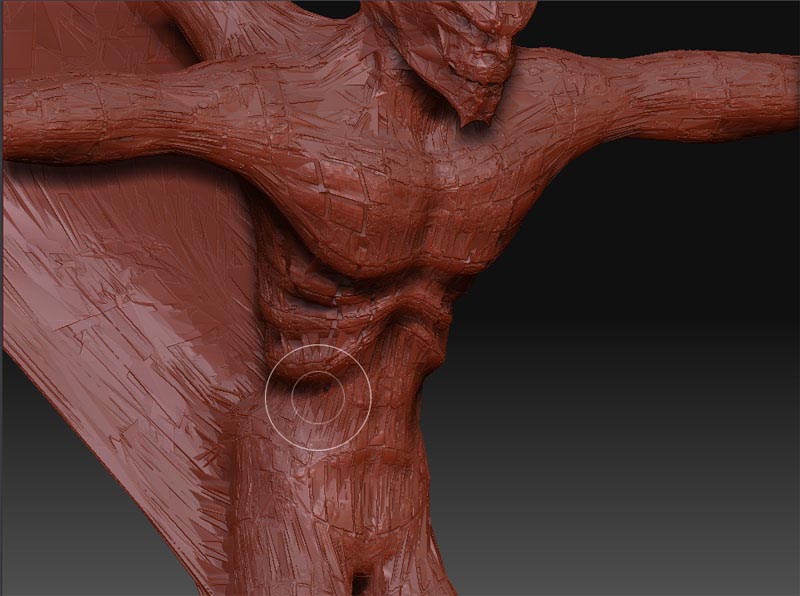
zbrushprob.jpg

you need to store a morph target first.

tool>morph target>store
tool>import
tool>morph target>switch

then up your sub D level.

that should fix your problem.

unfortunately that did not fix my problem. you weren’t specific on which subd level to store, so i tried you’re solution on both the highest and the lowest. neither way made a difference. any other ideas?

well i’m really confounded now. after i import the uvw file (obj format) from max, i should be able to set up a polygroup by uv group in zbrush. however that option is greyed out. i makes me think that it isn’t even recognizing that the UV’s are there. :mad:
I’ve only been using zbrush a short time, but i’ve watched a few gnomology demo’s that show what i should do, and none of it is working, i’m really not sure what is going on

Hello C-

Not an answer to your problem, but rather reassurance that you’re not alone. Been having the same problem with Maya/ Blender .obj exports for a while now. Just posted here with my issue.

Here’s to hoping this one can be solved :wink: