ZBrushCentral

Max UV to Zbrush Distortion

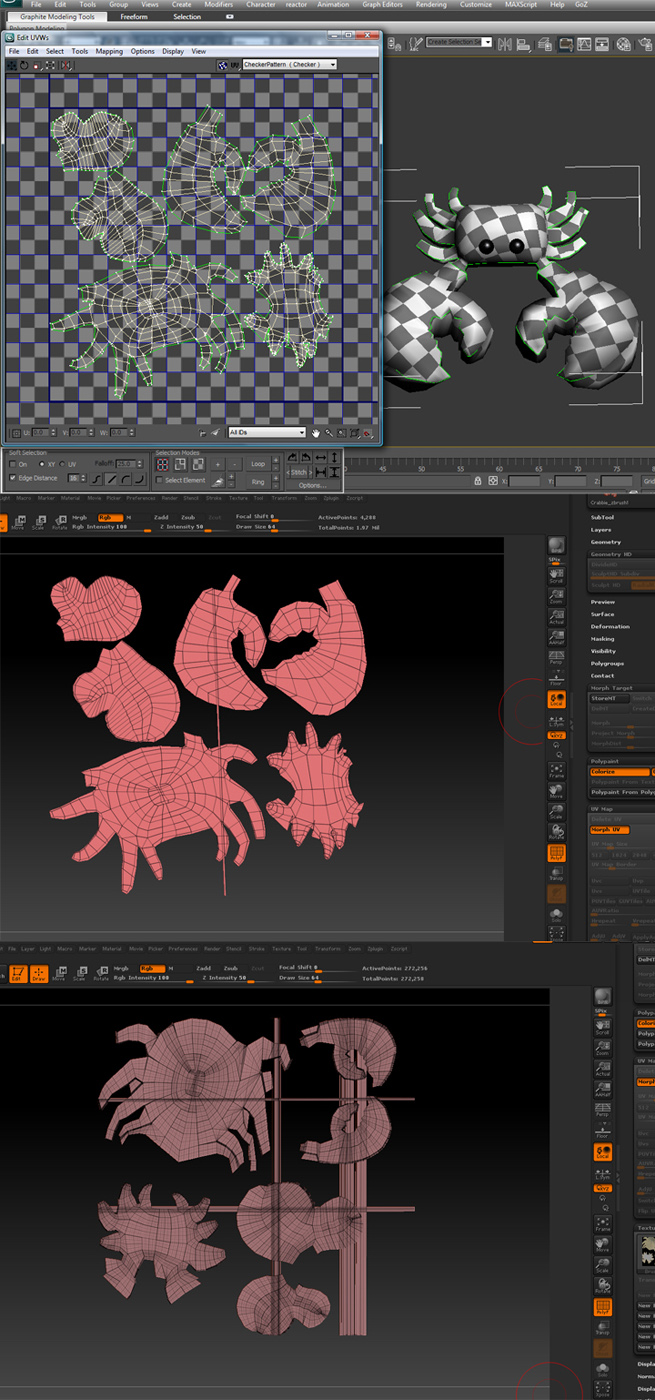
Hello, I made and Uv’d a model in 3DS Max then exported it to Zbrush. I’m not sure why, but for some reason i keep getting glitched uv’s
when i take it in to zbrush. Here’s the breakdown of my process.
1. UV’d in max
2. Exported and uvmorphed in zbrush (you can see the distortion)
3. Assumed that it was a minor glitch and sculpted in high res… When I looked back at the uv’s it looked like this

I thought this was just a silly mess up in zbrush and would be fine. But when I went to create all my maping's using the Multimapper, it created maps based on the UV's in image 3... In other words... everything I did is pretty much useless... Does anyone know why this is happening or a way to fix it?

Attachments

UV_NEWEST_PROB c232opy.jpg

Scale down your UVs a touch. They extend right to the edge of the UV space. This causes ZBrush to wrap those points, causing the lines. (You can check this by pressing Tool>Texture Map>New From UV Check - the overlapping portion will appear red.)

oh! jeez! lol. I can’t believe i didnt notice that before. ty ty