ZBrushCentral

Max to Zbrush issue ?

Hello friends,

I am sorry, I know there are hundreds of threads to this topic, but I can’t fix this problem.

I made a simple tire-rubber in max - one texture on it. The UVW mapping is done in max.

Now I’ve tried with different settings to export my tire-rubber as an .obj file.
My goal is to import into Zbrush with the right UWV Texture coordinates.

But this is what happens:

as you can see, the texture map is nice in max, but for some reason I get this strange distortion in Zbrush.

I’ve exported several versions from max2008 - but I wasn’t lucky. I’ve tried different settings from the manual as well, but didnt’ work.

The last one, I’ve tried to export from max2009 with the ZBrush Preset.
Unfortunately, same result. Also checking flipping V or H didn’t work.

Something is wrong, and I can’t figure it out, what it is.

So I’ve provided all the files, you can download and check:

- DOWNLOAD MAX 2009 FILE
- DOWNLOAD TEXTURE MAP
- DOWNLOAD .OBJ FILE EXPORTED FROM MAX WITH THE UVW MAPPING

Thank you for every little help,
I really appreciate that much.

hmmmm

Is your texture square?

512X512
1024X1024
2048X2048
4096X4096

Its a long shot but it almost looks like your vertically high on your texture

no, my texture is 773x1138 pixels - you can see and download from the link above.

Does it have to be euqal size, like 512x512 ?

  • by the way, I also checked to Reset my XForm
    but no change in the result, still the same issue.

Here is another test, with a simple box, converted into an Edit Poly.
One Texture map applied, same issue just with the box:

hmm… no idea what’s going on here…

I’ve tried it now with the texture map 1024x1024…

same problem… that wasn’t the solution.

texture map:

I made this very roughly, with the littel white thin line, to check in zbrush. I can clearly see it, but the profil is still weired stretched…

hmm, so what the heck is that ?

If I repeat H-Count 7times it comes close to the mapping in max.

But I can’t use it like that… I want to nail down the UVW Map when imported into ZBrush.

Also, I would like to use the map as an alpha map, so I can use it as a mask.
So I need to fix the export/import issue…

thx for every littel help and hint !

“are you working with max2009 or an older version? as it appears that the new guruware exporter destroys the vertexorder, can’t find a way to get it right, doesn’t even work in max… just export the exact same model und reimport it, and it’s messed up when you morph between both…”

from another user…

I had this problem with exploding meshes from 3dsmax2009 to zbr 3.1 until I tried the following:

Import subdiv1 obj into max, fix uvs or whatever u need to do, then
export using ‘zbrush’ export defaults in max, with the ‘vertex’ optimization turned off. THis seems to be the vital thing here. I’ve no idea what it is for ,why its there or what it does excpet stuff up the vertices in zbrush, so it’s quite evil.
After that, simply import into your subdiv1 tool in zbrush, no probs! No need to reimport reexport or anything, except you must never collapse to poly in max . This creates problems.
Additionally, as I use blender to uv, I found the export blender option works ok, but instead of trying to import the result from blender back into zbrush, I simply add a uvunwrap modifier in max to it, copy this and paste it onto the original mesh. Then export using usual method INTO ZBRUSH, WITH ‘VERTEX’ OPTIMIZATION TURNED OFF.
Also, turn on eflipy,eflipz,iflipy,iflipz in importexport prreferences.
I hope this saves hours of frustratinon for someone.

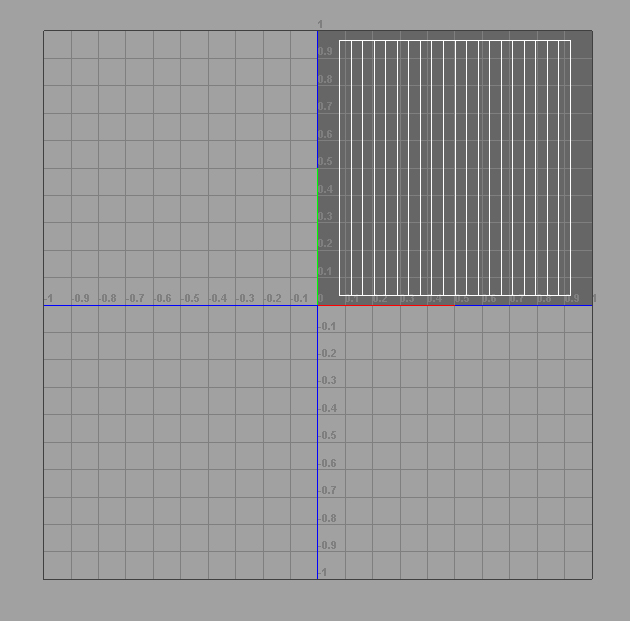
texture resolutions should always be in the powers of 2 thats just a proper etiquette. Another thing Max and Maya will understand UV’s that fall outside +U+V

[UVS.jpg]

Keep your UV's in the top right +U+V spot for Zbrush unless its a wacky project (Zbrush image plains for example) If they go outside that box it could lead to that stretching effect also. Multi UV's always fit within any one box per part or object but never attach across multiple boxes.

hello and thank you so much for your suggestions and help.

Unfortunately, nothing worked so lon.

I tried max2008 and max2009 - both options didn’t work.

I also made the texture map 1024x1024 - and it didnt’ work.

I am not sure if I did understand your idea, with the texture coordinates, that the texture shouldn’t be outside this grid you have posted.

I usually map in max, and even if I use the unrwap UV modifier, I can see clearly that the map fits. From where did you get that grid ? Inside ZBrush ?

Thx for every littel help and suggestions…

I figured it out.

You have to use the Unwrap tool so you can layout your UV’s and after that is done, you need to make your texture according to that UV map.

Everything else, worked fine.