ZBrushCentral

material/lighting problem

Hi all,

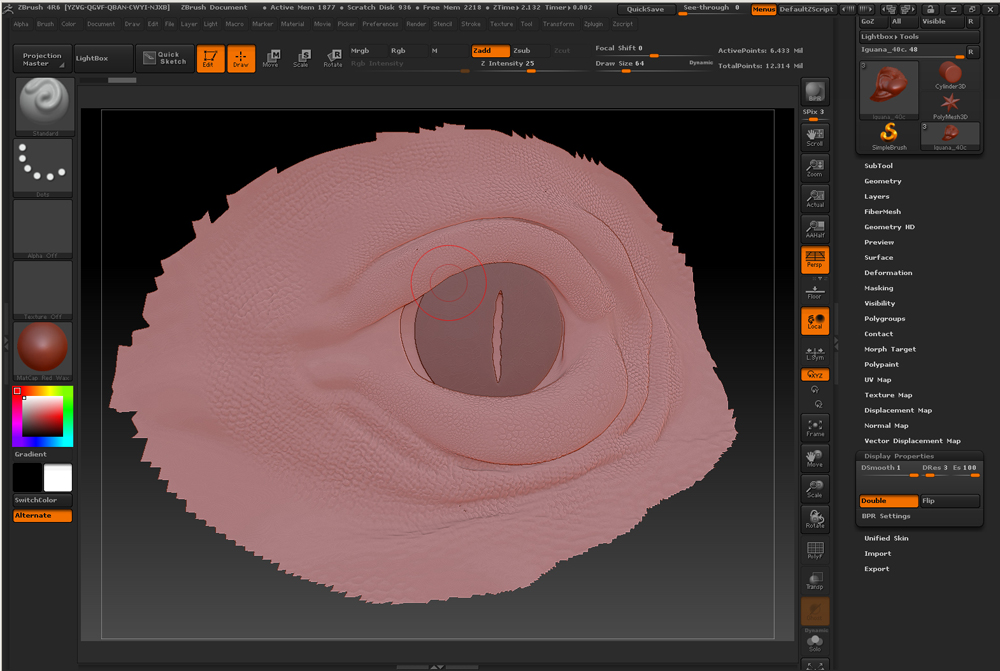
I think I accidentally pressed a shortcut or something but for some reason, no matter what material I select its looks much flatter/lighter. Does anyone know what this could be? I know it’s some small option but I can’t find it :frowning:

Thanks,
Danny

Attachments

problem.jpg

But you don’t know what you did. That makes it tough…I see lots of UI but none of it concerning the Material pallette. Lights certainly affect how it looks. Did you play with lights at all? Be aware that selecting some brushes enables polypainting, when selected, that can cause problems.

No unfortunately I have no idea what I did. But it must be some kind of ‘mode’ in which I can’t sculpt but I can export maps, turn off/on the maps on the model. I can rotate around the subject. The only thing I can’t do is sculpt and look at it in the ‘normal shaded’ mode, whatever material I assign…:confused:

Well, I didn’t found the solution but for the workaround I exported all subtools at highest division to OBJ’s as well as the texture maps, imported those in a new ZBrush session and reconstructed the subdivision history and everything works fine now. If somehow I found out what I did I’ll post it here but for now it’s fixed.

Danny