ZBrushCentral

Material is Appearing on other Subtool

ZBrush64_2017-07-19_12-43-35.jpg
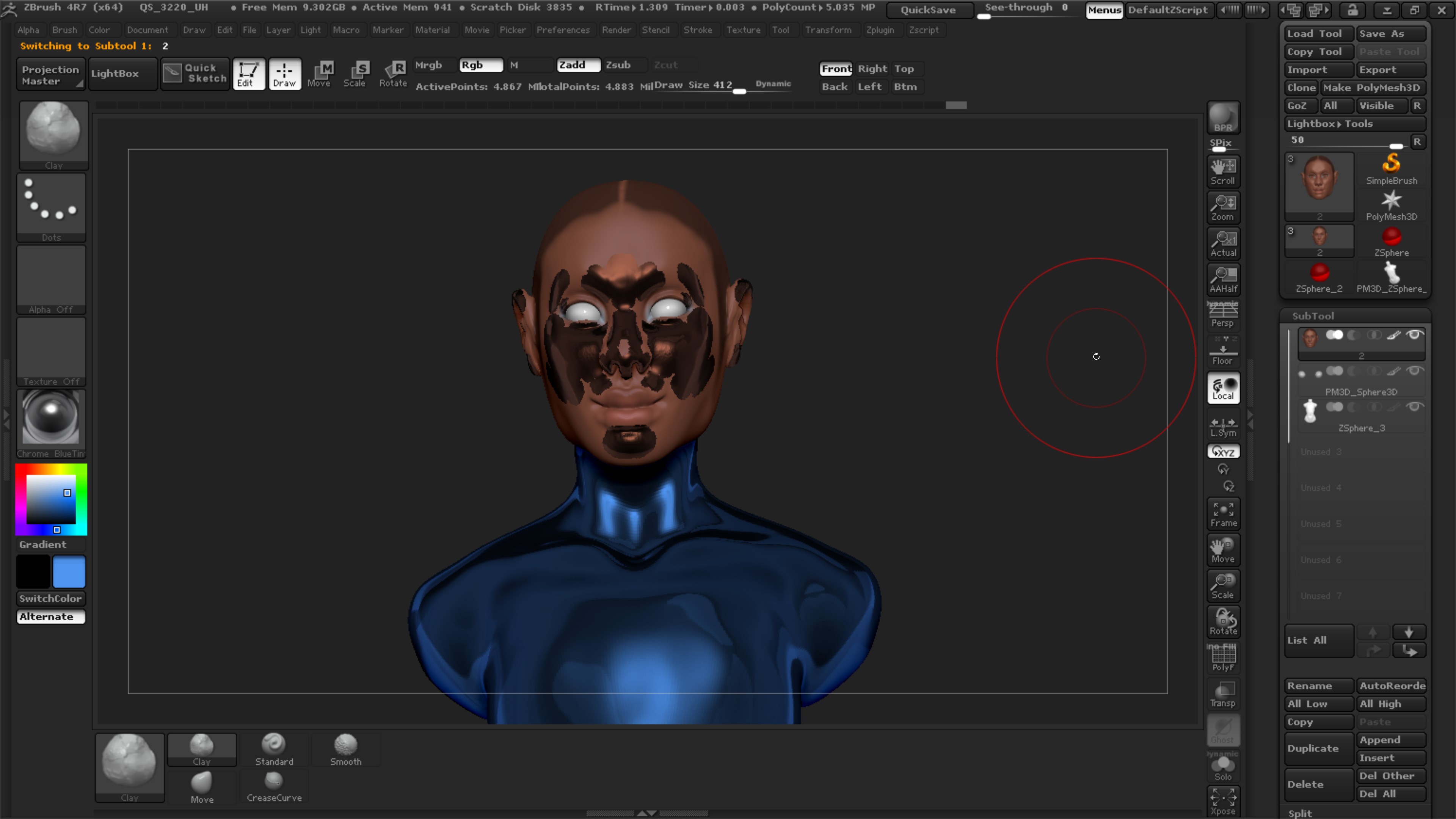
here’s the issue:

I have 3 subtools, one for the Model’s head, eyes, and torso. The head has the SkinShade4 material, the eyes have ToyPlastic, and the torso is also SkinShade4.

I decided to give the torso a different material, and I switched it from SkinShade4 to Chrome. When I did that, these blotchy spots appeared on the head subtool. When I hide the torso’s visibility they disappear. Where did I mess up?

Attachments

ZBrush64_2017-07-19_12-43-35.jpg

Those sections on the head aren’t filled with polypaint for whatever reason. If polygons are not filled with paint, they will preview whatever the active material/color selection is.

Select the head subtool, and make sure any masking is cleared. Choose the color and/or material you want to fill it with. Make sure either M (Material only), MRGB (material+ color) or RGB (Just Color) is active, then go to Color > Fill Object. It should now be filled with the selection and will preview that material/color no matter what the actively selected material/color is.