ZBrushCentral

material "blacking" randomly

I have an issue and I don’t know what is causing it.
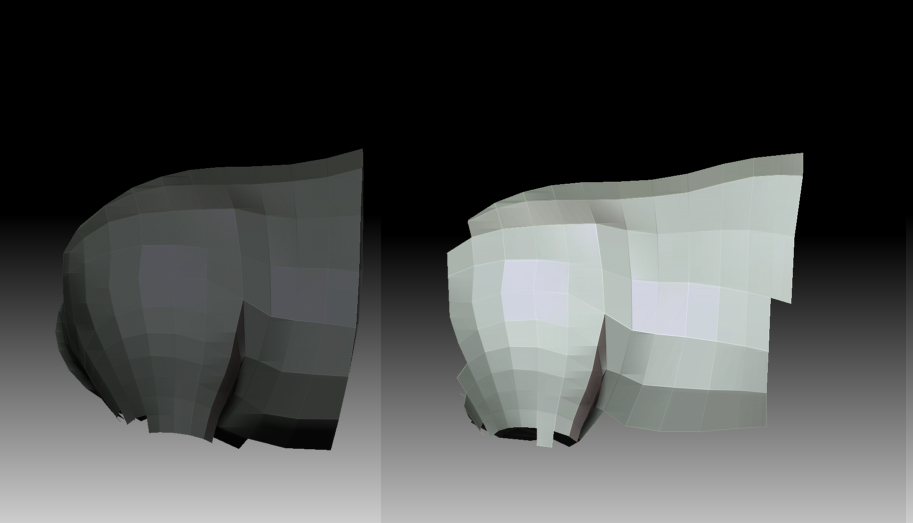
Out of the blue while I am working, my model will all of the sudden become very dark, as if it is masked. However, it isn’t actually masked because I can still sculpt, move it, etc. It is just really dark and whatever material I change to is dark.
I have to export the entire model, all subtools and re import them to "clean’ it off.
I haven’t been able to isolate a specific thing that I am doing yet to cause this. Has anyone else experienced it and knows how I can avoid it? With a bunch of subtools it can become very tedious and has happened 3 times tonight.
The photo shows the problem on the left, the real material on the right.
Thanks,
Heather
DARK.jpg

Heather, i’m not sure, but i had encountered this same thing last year, instead of exporting as you do i just cloned and that seemed to clear it up. The only time i now see something similar is when using the Image Plane plugin and lowering the models opacity, what i found is that if you save your model while it has less than 100 opacity, even when you reload it with the slider at 100 your model will be darker, something strange about that.
also, i’m sure you checked these, but in the color palette is pure white selected?
is there any polypainting on the model?
lastly it might still be a mask but at a very low opacity/rgb value, are you able to move it as much as if its not masked, are you actually hitting the clear mask button in the masking palette.

You know, I haven’t tried cloning it so I will give it a try.
Yes, twice today was when I was using image plane, but it has also happened when I never even loaded up the image plane, before I ever even tried it before. But definitely it happens more with it on.
Everything else is business as usual, color palette is white, cleared mask, no polypainting.
Thanks for the tip about not saving with less than 100 % opacity, that should help.