ZBrushCentral

MatchMaker Conformity Parameter?

Is there a way to adjust the conformity radius of MatchMaker, so that it matches topology to the gross deformations, but ignores the fine cracks and ridges? There are many occasions when one wants a subtool to flow across the landscape of another tool, but not look like it has been extruded from that tool.

Please also reply if you have any suggestions how this effect might otherwise be achieved without resorting to MatchMaker.

Thank you so much for your time,

Rory
The MatchMaker brush is sensitive to the Z Intensity setting. Normally you would use a setting of 100 but setting to a lower value will give progressively less conformity.

Thank you Marcus for your suggestion.

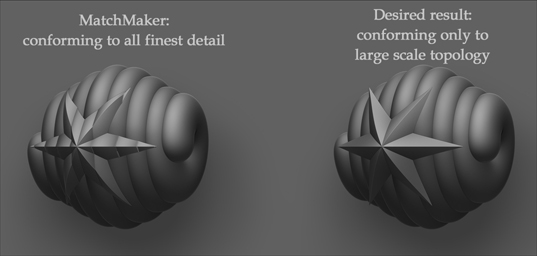
I’m not making myself clear, I think. Adjusting the Z intensity will modify the amount of conformity, not the quality of it. Like adjusting a blur radius in a 2D paint package, I want to adjust the sensitivity of MatchMaker to topological changes. This picture shows on the left what MatchMaker does to the PolyMesh star, with my desired result illustrated on the right. This was mocked up with the Move brush, but I’d like to be able to do this in a more procedural manner.

Any ideas, greatly appreciated!

Rory

MatchMakerTest.jpg

OK Rory, now I understand better.

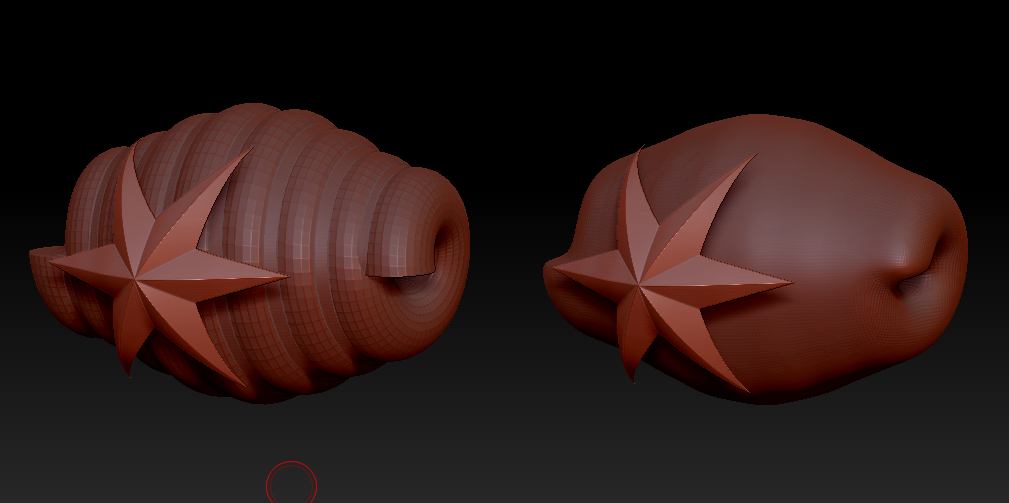
I think the simplest way is to make a temporary subtool that can be used to create the right profile. I did this by duplicating the helix, then using DynaMesh with Polish on to create a smooth version.

Attachments

MatchMaker.jpg

Thank you Marcus: good idea for now, though an augmentation of MatchMaker’s functionality in the future would be nice too.

Cheers,

Rory