ZBrushCentral

Matcap not displaying right

I tried downloading the rough bone material from the Mat Cap library on pixologics site, but it is not displaying right. I was told it might be a compatibility issue. I’m using zbrush 4r3, and ive tried this on multiple machines with the same problem. I don’t know anything about how to make a custom material and why I tried looking at Meats Meier’s tutorial www.pixologic.com/docs/index.php/Tutorial:_MatCap_Skull , but I think it was for an older version of zbrush, so I’m missing key information. Here’s what the bone mat looks like on my model, and on the right is what is should look like. If someone can help me fix this or reverse engineer it so it will work on 4r3 I’d appreciate it. Also if you can point me to an up to date matcap tutorial that would be great.

Attachments
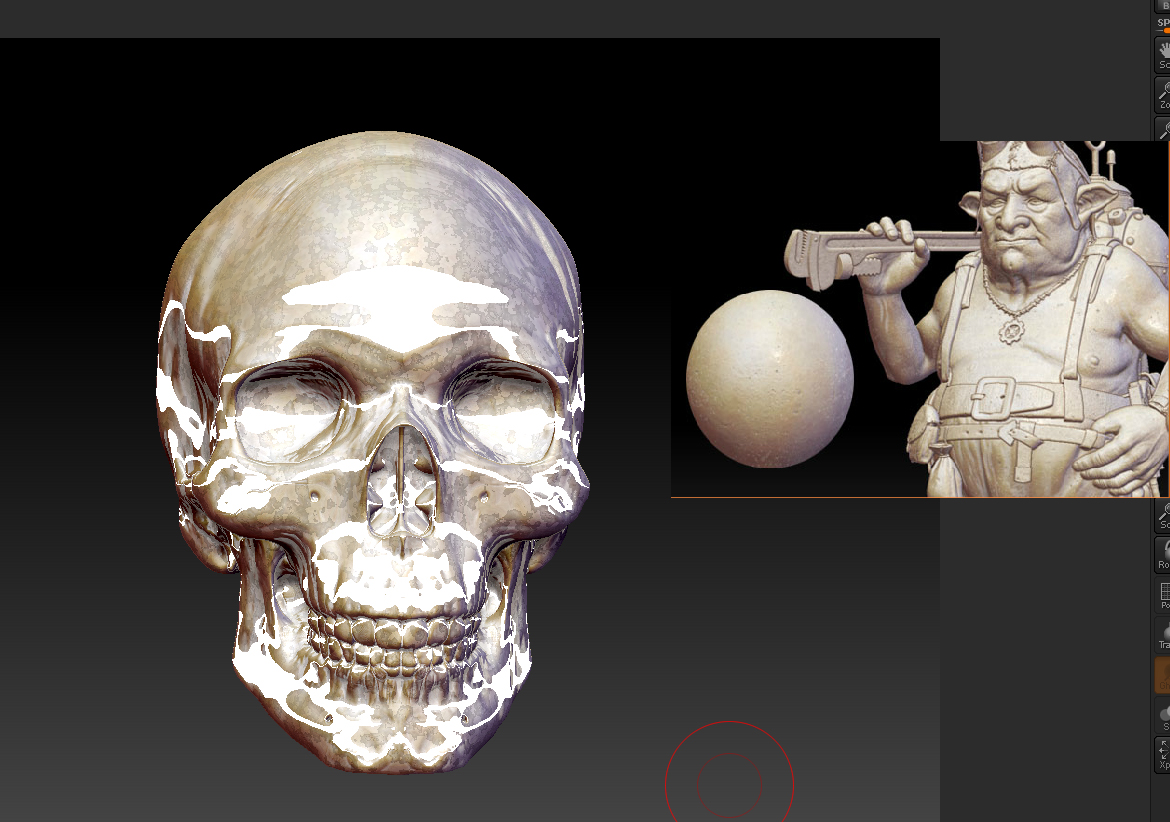
roughboneMat.jpg

If it’s an older material file, you may have to make some adjustments to it in newer versions (Materials: Modifiers).
In this case, the specular seems to be coming mostly from S3. Dropping the Lower Outer Intensity value will get rid of it.

You may also want to play with the noise value/radius in S1, and the cavity detection/transition settings in S2

I re-did that matcap to work in 4R3. It’s here if you want it.

repaired bone matcap.JPG

Awesome. Thank-you both!

fwiw… I’ve found that even though the preview/BPR for some of the older matcaps look funky, the materials do render just fine with the Best renderer.

Don’t want to start a new thread, cause i have a similar issue (had the same one described but obviously thats just a version problem and is fixed by using best render, even though that makes those materials kinda useless, since you don’t really have any idea how they look when you want to polypaint over them)

I watched a tutorial from Digital Tutors on building a Doubleshader for skin. (http://www.digitaltutors.com/11/training.php?vid=1009 Lesson 9 specifically)
I followed the steps and he changed around diffusecolor, specularity and all that in the modifiers tab and the material preview (the circle where you choose which Material you currently want) changed the looks instantly.

Now my issue here is, that i can change around what i want: the model changes, the previewcircle doesn’t.
It doesn’t seem to be a problem since the model still changes, BUT as you know a lot of the material modifiers settings only change when you turn on Best Render and that makes it really hard to work with the curves, cause of the loading times.

Any idea? Kinda hard to describe, so I hope it is clear what i mean.

That tutorial was made for 3.1, so i guess i might just miss an option to turn on or off in 4.