Matt, Marcus or anyone else who knows…
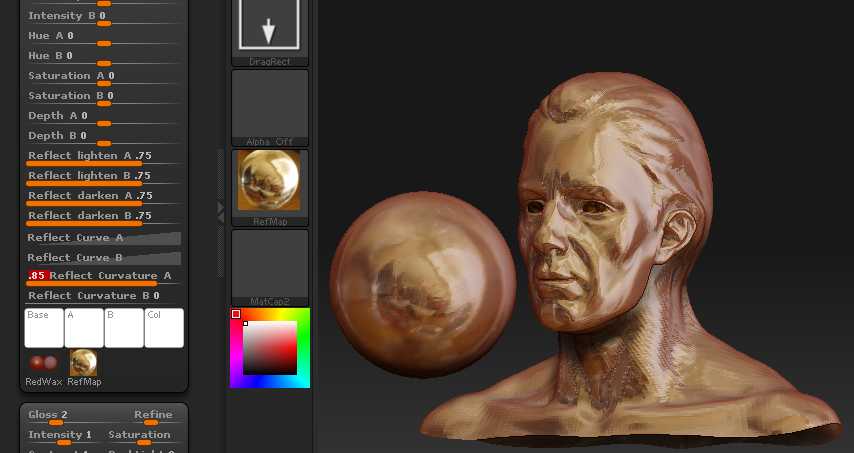
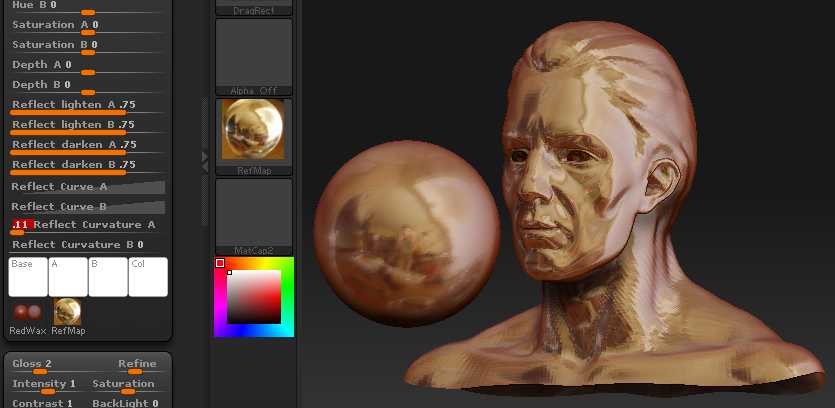
Hidden amongst all the other default MatCap materials is one named MatCap2 which, when selected, displays a more complex profile of parametric sliders different from all others. It is the only default matcap afraid to show its icon. Its profile even includes an optional second window (Material Texture 2) where another, square map can be loaded, apparently having to do with reflection.
I can’t find ANY documentation detailing the purpose of these alternative parameters (highlighted in the list below) and after much experimentation I haven’t been able to discern how most of these sliders affect this MatCap2 format.
Can anyone point me to some additional documentation? Is this an unfinished material definition released by accident?
Thanks, Svengali
Opacity slider
Cavity Detection slider
Cavity Transition slider
Intensity A slider
Intensity B slider
Hue A slider
Hue B slider
Saturation A slider
Saturation B slider
Depth A slider
Depth B slider
Reflect lighten A slider
Reflect lighten B slider
Reflect darken A slider
Reflect darken B slider
Reflect Curve A slider
Reflect Curve B slider
Reflect Curvature A curve
Reflect Curvature B curve
Base - A - B - Col (color icons)
Material Texture 1 (sphere or double sphere icon) - Material Texture 2 (square map)