ZBrushCentral

masking help important

i have a model where tow surfaces overlap is a shirt collar , the problem is where the shirt collar and the shoulder part overlap, when i try to mask the shoulder the top part gets mask too and i don’t seem to find the option for masking adjacent faces only or tangent faces only zbrush seems to work in a projection mode all the time …

help here

camisa.jpg

Backface Masking (in the Brush palette) may help with this.

If not, as the model created in another app? If so, the best thing to do would be to redo its groups a little bit so that the collars are separate groups. You can then hide the polys that are getting in the way, and backface masking will definitely work.

i think i wold have to do some uv groups bur, in the long run when i have similar problems but when overlapping is part of the same uv group should be an option to select or mask faces based on where i start to paint and another based on the xy projection of the brush like in maya and polypaint tool.

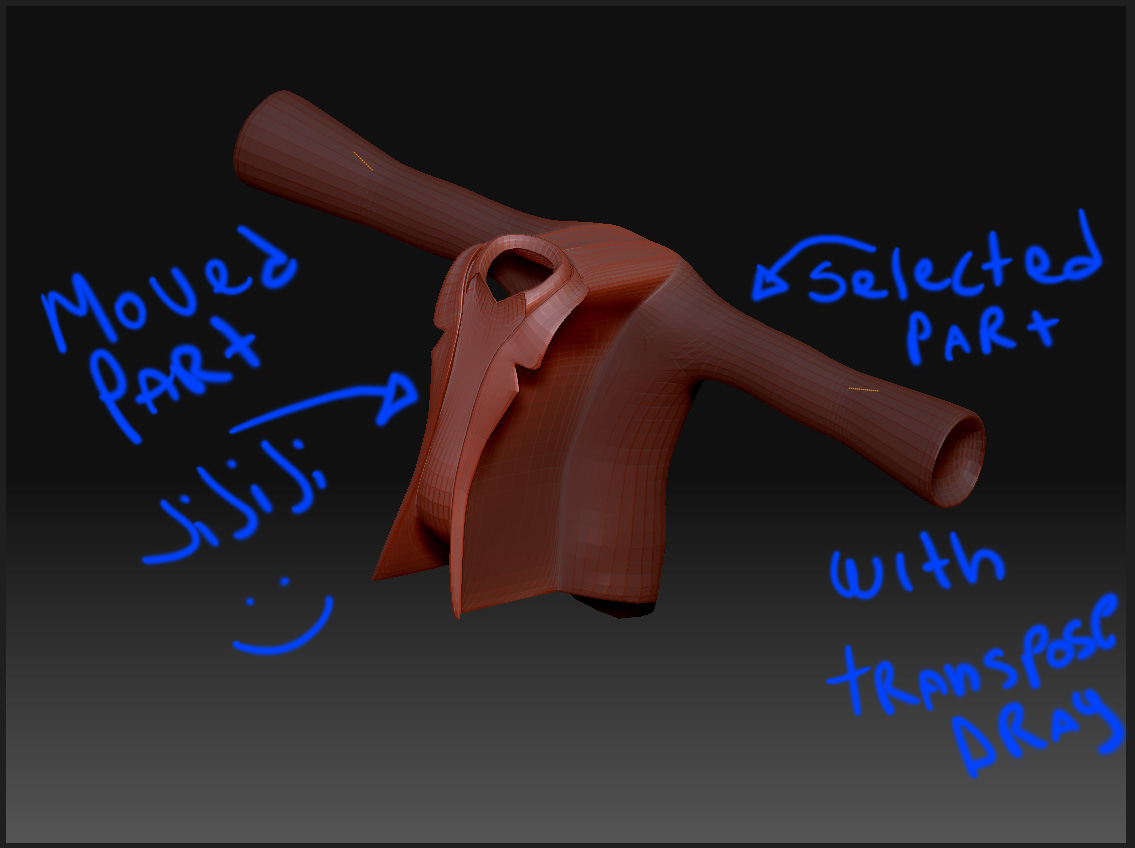
HI i just found a solution goggling around looking for zbrush uvmaps… i just realize in a tutorial on how to make uv groups within zbrush that with transpose it work with adjacent polygons selection method i was able to select the underlying shoulder part using this method:

with the model in edit mode, select the move, rotate or sacle option (not draw option) that corresponde with the Transpose tool (the little tool with three rings and a line crossing ) then just click on a poligon that correspond with the are to be mask and drag it , trasnpose is sopose to select on an adjacent polygon based on the distance and direction you drag .

here is the tutorial i found this solution, is about uv mapping in zbrush:
http://www.pixologic.com/docs/index.php/Tutorial:_Birth_2

. here is an example , hopes this helps someone on his journey

Attachments
transpode_solution.jpg