ZBrushCentral

Masking and not selecting things other then the surface being worked on....

|Hya Everyone,
|
Hya ZBer!!!

I have yet another question, imagine that.
With sculpting if you are doing something on a thin object you turn on Backface Mask and it keeps you from mangling stuff on the other side of what you are working on, a very spiffy feature.
What I am trying to do is that box modeling stuff where you use masks and the transpose tools and back face mask is not working, no mater what I do I cant make it stop selecting all the way through.
Is there an equivalent for backface masking while creating a mask? The problem areas are impossible to get at so I cant do it by hand, and even if I could it would be a nightmare.
What I am working on is a bunch of hollow tubes that are close together and I want to work on the outside of one tube with out affecting the others, the inside of the one I’m working on, or the back of the one I’m working on.
What I am seeing is that if I use Mask Rect (for example) I select everything behind the mask and cant get at the bits I don’t want to unmask them.
Does that make sense? Did I say that all twice? My brain is broken.

In this example you can see the the area Im working in, its lighter. What I was trying to do is use mask rect to select bits inside that hole so I could extrude them in various directions and do stuff like use inflate on the edges.
Heres the example:|

I hope this makes sense, backface mask was the only thing that seemed right…

Cheers!
Mealea

Attachments
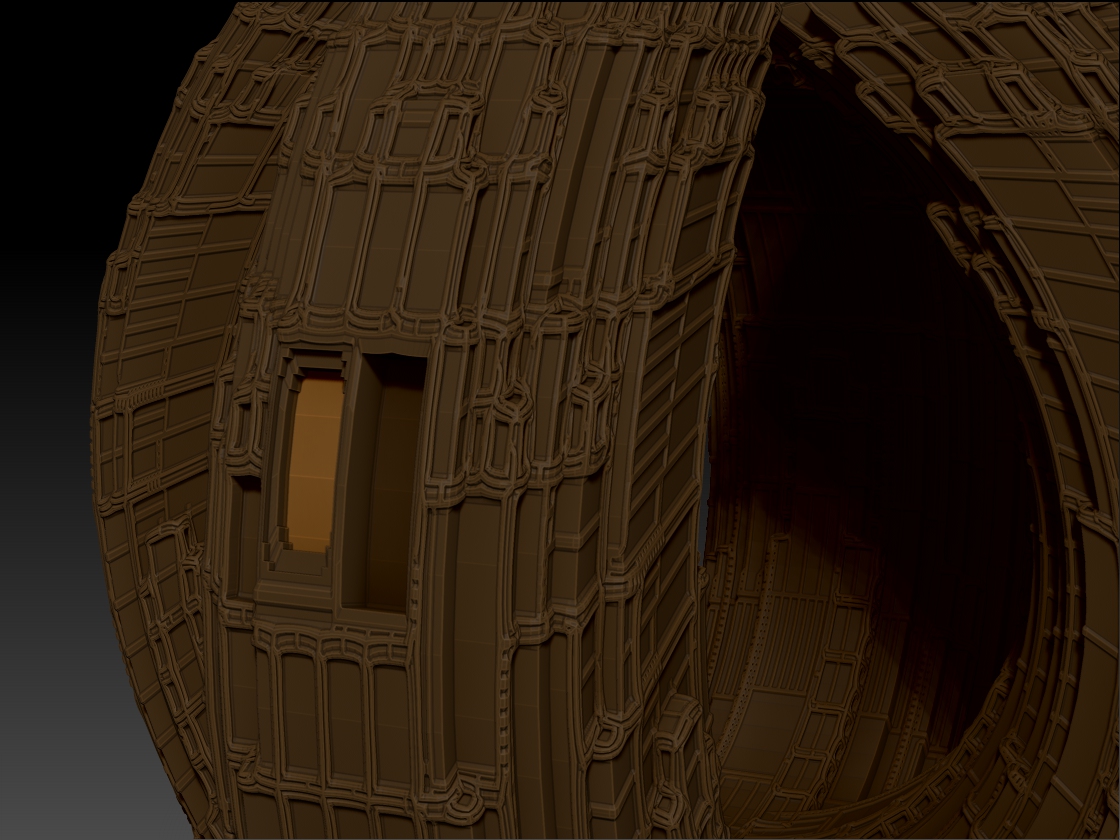
MaskMeMaskMeMaskMePleeeeeeze.jpg

Hi Mealea,

Yes, BackfaceMask doesn’t seem to want to work with Rect, Circle or Lasso strokes for some reason. Dunno know why. You would have to ask Pixologic. What you can do is hide (Ctrl+Shift) the backside of what your working on or mask and then Alt mask the backside. Hiding is probably the easiest way to go.

edit: oops, I just noticed that Alt mask isn’t working for you so just disregard that bit. DOH!, my brains broken too. :confused:

hehehehe!
Thank you ZBer, its making me crazy.

I actually got a little closer using Control Shift but that actually does the same thing as masking and goes right through, but I can poke out polygroups which there are a few thousand of and sort of see what I’m doing.

I tried using negative insert meshes for this but I cant see where I am placing them so that is not working either, I did get one right (sort of) but it took an hour to get one simple cube into place and by then I forgot what I was doing with it. That blanking out of the target object problem again.

Alt masking does work in general, just not in this instance, its too hard to get at…

Control Shift dragging about 500 times got me where I needed to get, and now I am SERIOUSLY good at it.
I think what I want to do here is not only beyond my ability but beyond my computers ability to cope with what I am doing.

ZBer!!
I was doing it wrong!
I am such an idiot, and you were right: what I need to do is use Control Shift CLICK (not drag), and THEN start screwing with masks, but not by hiding everything at chunk at a time (like I was using drag), all I had to do is Control Shift Click on the polygroup I want to work on (after doing the same but with drag to make a cross section so I have an idea of the depth I am dealing with blah blah blah…).
The main thing is that if everything is hidden except where I am working its peachy and the creation of the mask only affects what I am working on and does not drill off into oblivion looking for more polygons to mangle.

Also it speeds up ZBrush so much to have all that other crap I’m not working on ts amazing.

Thanks yet again, this was interesting!

There is a workaround if you want to use a circle or rectangular mask (or any shape for that matter) and have BackfaceMask work. Use a DragRect stroke with an alpha instead of the Circle, Rect, or Lasso strokes.

Ah yes!..polygroups make life so much easier. :slight_smile:

|

Ok!
That’s neat! And it WORKS!
There are some VERY big differences between rect and drag rect as it turns out and I need to sort of poke at those more, rect for example does not rotate like drag rect, unless… hmmm… is there is a key for that?!?
That would be cool.
Anyhow, using bits of all of this stuff has done the trick, and now I can keep going, provided I don’t make too many more polygons…
Im a good bit over 3 million and things are slowing down a bit…

Here is something odd though; if I Control Shift an area to hide everything else and I then use a mask and the transpose tools it seems things like Control Drag with Move and Scale no longer add edge loops or new polygons, is that the case or am I missing something?
More edgeloops allows me to make nice sharp corners (or control amounts of curve and bevel) and shape the heck out of things…

There is SO MUCH TO LEARN!

Thanks again ZBer! This is a lot of fun!

|