ZBrushCentral

Mapping shortcuts to keys such as ";" and """

So in moving over to 3.5R3 from 3.1, I noticed that i can’t quite get my shortcuts to be close to what i had before.

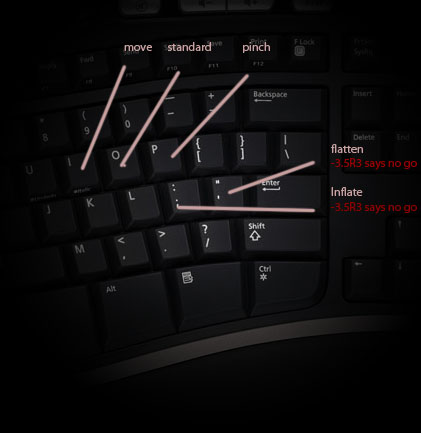
The image below shows my basic key setup for 3.1 which worked great. But when i ctrl+click and try to do a shortcut for ; and ’ keys it says i have to make it A through Z or 0-9.

Is there a way i can override this? Like may be with a script or something!? I would really like to attach the shortcuts to those keys (and then-some). Even though they are not letters, the placement of those keys are really useful for Zbrush, Photoshop, and video games etc… Are they locked out of ZB for a particular reason?

Thank you

Attachments
zbshortcuts.jpg

Hello

That is because of the new shortcut system for brushes which extremely helpful. If you are in the fly-out window then those short-cuts can only be 1-9 or A-Z. However, you can still assign the “;” or the " ’ " key to brushes but you have to do it another way. Steps below:

  1. Move the Brush Palette to the Right or Left Tray. Which ever you prefer.
  2. Click on the brush that you want to use for " ’ ". For you its Flatten.
  3. Now when you select a brush in ZBrush a little icon of that brush is added to the Brush Palette.
  4. Switch to the Inflat Brush.
  5. That little icon will be added.
  6. Make sure you have that Inflat small icon select.
  7. Click+CTRL on that small icon in the brush palette, not the larger icon which also shows the Inflat brush. You can assign the “;” to it now.
  8. In Step 2 you had selected the Flatten brush so now CTRL+click on the small brush icon and assign the " ’ ".

I had no issue with this workflow. Give it a try and let me know.

Paul

Looks like its working! thanks!