ZBrushCentral

Mapping Asset Directories

WinXP32 SP3
ZBrush 3.1
3dsmax 2009

Is there a way to map directories for certain types of assets in ZBrush? I like to keep all of my texture files in the Images folder of my 3dsmax project directory, because max is where I do my rendering. When I’m working in ZBrush I find that I have to do a lot folder traveling, because one minute I want to load or export a tool, and the next minute I want to load or export a texture, and ZBrush defaults to the last directory you accessed.

[[attach=145093]directories.gif[/attach]]directories.gif
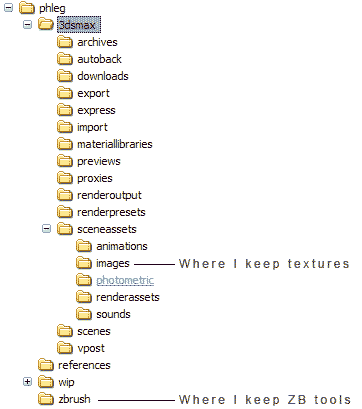
I’d rather not keep my textures in both locations, these things are 2k or 4k, so that seems like a waste of HDD space and an ineffecient use of reources. So what I’d love to be able to do when I start a new project is tell ZBrush to look in specific directories for ZTools, textures, OBJ files, alphas, etc.

Thanks,
Dustin

In the Preferences, turn “Use ZFolders” on. Then in each of the ZFolders (such as ZTools) create a shortcut to the folder that you want to use.

What will happen is that when you click one of the save or load buttons, ZBrush will browse to the appropriate ZFolder for that particular resource type. From there, just double-click on the Windows shortcut that you placed within the folder to go to the place that you actually want to use.

Sorry, aurick, I see now where you have that on the faq in the docs. I like the sound of the plugin Amintus mentions. I’ll check that out.

Dustin,

If you are using a PC, I’ve run across a handy utility that might be very helpful for you both inside and outside ZBrush, something called Filebox Extender. It attaches itself to the File Explorer window and lets you organize your folder favorites and provides you with all kinds of extra bells and whistles like submenus, etc. It is very well documented.

I use it ALL the time now and couldn’t get along without it.

Sven