ZBrushCentral

making use of partitions of UV Set Space - Possible?

Hello to all who view this.

I am wondering if it is possible to utilize only a portion of your UV set space in ZB, for texturing and exporting displacement,normal, and color maps.

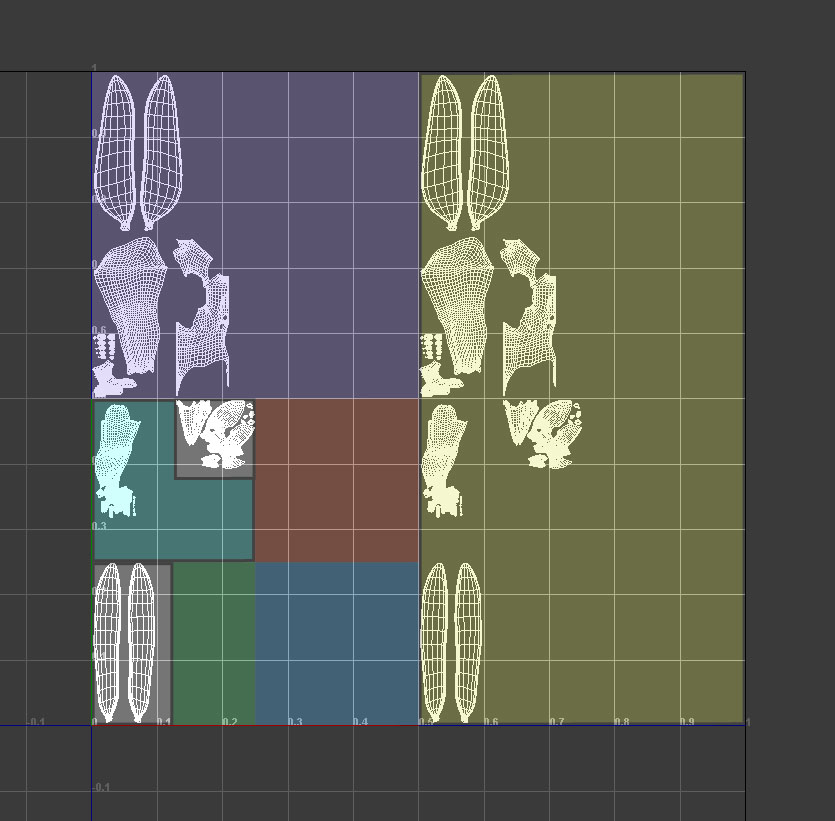
The image below shows how you can, in Maya, break-apart the 0-1x0-1 space into multiple regions that can themselves host a single square or rectangular map (different regions are indicated in the image by different colors); by repeating the maps as appropriate in the U and V, and then blending them together in your shader network you can maximize the greatest range of reusability, resolution variation and Asymmetry, and deal with the quirks of Maya’s bumpmap to UVlayout relationship.

From what I’ve read it seems that ZB doesn’t do non-square maps, but I haven’t been able to find any commentary on whether it can segment the 1-1 space into smaller chunks in this way that are themselves treated as individual UV spaces, such as 0.5-0.5 space etc. Similarly to how in Maya you can do a UV snapshot of any arbitrary space.

I know ZB reckognizes different UV spaces, and I will be working with those, but I’d like to be able to break each of those down, as shown in the image.

Any help would be great.

FYI - I won’t be able to check responces 'till tonight after work.

Attachments
UVlayoutTechniqueIllustration_002.jpg

back to the top

in case anyone is interested in knowing …

part of the reason that I have with the above technique kept everything in the single default UV space is that somewhere way-back-when I got the idea in my head (from a co-worker) that only textures in the default UV space (1 to 1 space) get rendered. I now think that that was a misunderstanding on the part of my co-worker (or mine). I decided to double check that idea, and have found that indeed you can utilize the technique illustrated in my first post, across several UV spaces, rather than segmenting just one - you just have to repeat your textures by fractions of 1 (eg - 0.5x0.5) rather than multiples of it (eg 2x2). This allows you to spread a single texture from, for example, -1to1 by -1to1.

The short of it is that for the moment I don’t need to know the answer to my original question, but if someone does know the answer please share, I’m bound to find a use for it when I encounter a need I hadn’t anticipated.

Thanks

Update, actually I already have a need for that, so please reply if you have a suggestion.

Yes, you certainly can use multiple UV spaces like that. In fact, after importing your model into ZBrush you can press Tool>Polygroups>Uv Groups to group the model based on the UV spaces. From there you can press Tool>SubTool>GrpSplit to break the model into different subtools based on the UV’s.

Multi Displacement 3 (found in the Zplugin palette) can be used to calculate all displacement maps at once for a model with this type of UV mapping.

Thanks for the reply. It’s nice to get one:)

Actually though I’m already familiar with that functionality, the intent of my question was more to see whether it’s possible to break apart a single UV space into smaller divisions that are themselves treated as individual UV spaces. So, rather than baking a Displacement Map to the 1 to 1 space, you could bake to the 0.25 to 0.25 space … as an example. I would use this ability in conjunction with the standard multiple UV space technique you referred to.

If you have an answer to that I’d love to know it. I’d have an immediate use for it. If you like I can explain in more detail just what the advantages of this are. It might be helpful in answering my question to know the reason I’m asking it.

ZBrush won’t recognize a partial UV space. It deals completely with full spaces such as 0,0 to 1,1 or 1,0 to 2,1.

Of course, if you want to put all your UV’s within the 0,0 to .25,.25 space there’s nothing to prevent you from doing that. What you’ll get is a map with only 1/4 of the available space being used.

Yeah, I had a strong feeling that that would turn out to be the case. Thanks for confirming it. At least now I know one-way-or-the-other.

Considering your moderator status, perhaps you know know a few folks at pixologic. If you do, maybe you could pass this idea to someone there. I for one would use it.

Thanks