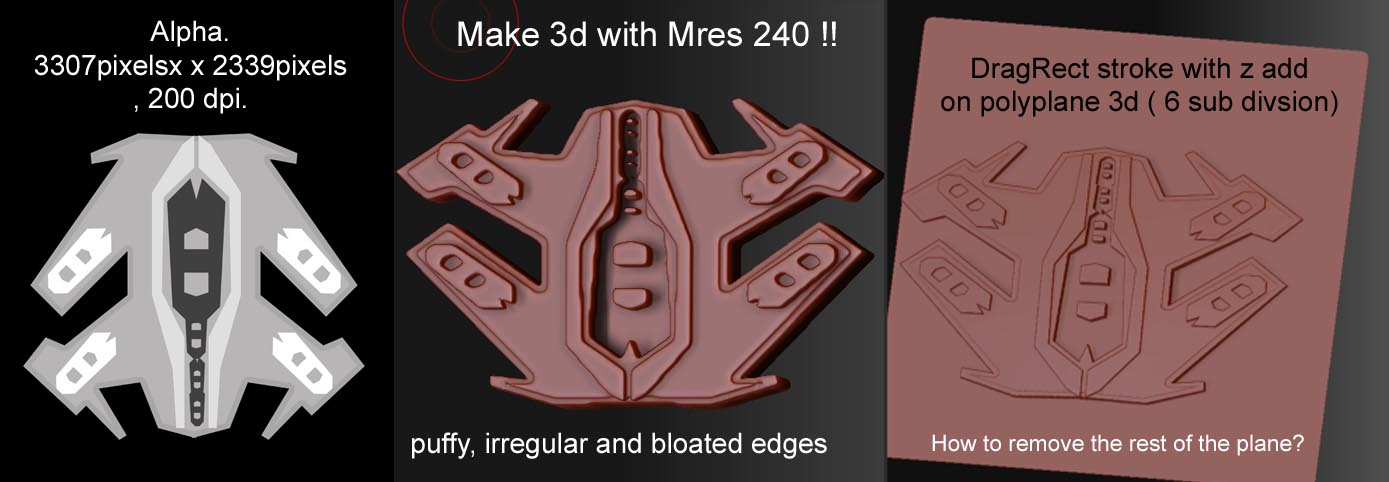
Hi! I want to use alphas created in Photoshop, to make hard surface polygonal meshes in Zbrush. The make 3d option in the alpha palette gives a puffy mesh even after a high resolution, sharp edged alpha is used.Adjusting the Mres, Mdep, Msm settings in the alpha drop down menu didn’t yield ideal results.
However, when I subdivide a polyplane tool several times, and use the DragRect stroke brush to draw the alpha with z add turned on, I get a sharp result. but this technique doesn’t create a shape cut out. It just creates a good deformation on the plane.I need to get rid of the rest of the plane.
so basically.
-
Is there a way I could use the make 3d option more efficiently to get the meshes to be as sharp and precise as the alphas.
-
Alternatively, how can I use the plane 3d object as the base to cut out my shapes? I want to use the Stencil tool for this.Somehow ,I can’t paint a mask ( for hiding and deleting geometry )through the stencil. Perhaps that’s because the stencil itself is a mask. :eek: Using the dragStroke brush to create the mask doesn’t work too well either.
Some tips and techniques will be greatly appreciated. 
Attachments