ZBrushCentral

Losing changes with AS Densitiy Level

Hello, I have the following problem, thank you for reading:

I draw with ZSpheres, now I want to work on the resulting object, no ZSphere work necessary anymore.

I move the object so it fits the sketch. So far so good.
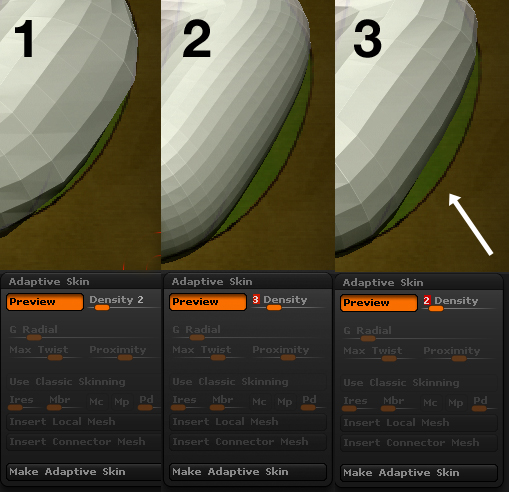
(Image 1)

I increase the Adaptive Skin Density to a higher level, so it looks better. I’m not sure wether I’m doing things the right way.

I notice that the shape jumped back to it’s original unmoved form = does not fit the sketch anymore.
(Image 2)

I decrease back to 2 but still my moving work is lost.
(Image 3)

What am I doing wrong? I want to keep the changes. I don’t need ZSphere capabilty anymore. Is A.S. the correct choice?

Attachments
ZBrushProblem.jpg

you need to convert you Zsphere mesh into an adaptive skin or a unified skin. You then need to select that new mesh that is generated (skin_meshName).

Once there you need to be using tool.geometry to increase your density.

Cool, thank you!

I noticed that when I do it this way, I lose the plane with the bitmap. I draw the new skin and it’s just the model without my image plane. How can I draw the new skin + the image plane with the same size and rotation relative to the skin as the image plane was in relation to the original zSphere object?

append in the plane you had before into the new object.
or append in the skin mesh into the previous tool you were using.