Hello, I’m a little new to this site and to zbrush. I’ve been watching a few tutorials that are helping me learn a few techniques for modeling hard edges which has lead me to mess with my settings a bit. After putting my settings back to what I thought was default, I realize that when I use symmetry, my brush seems to fade out on the other side. I made several attempts to reset the zbrush defaults, such as Preferences>Init Zbrush, and Preferences>Restore Standard UI, but now whenever I use symmetry, my brush fades on the other side and by the time my brush reaches the side of my model, the opposite side isn’t being affected by symmetry anymore. Any help would be appreciated. I have never had this happen before.
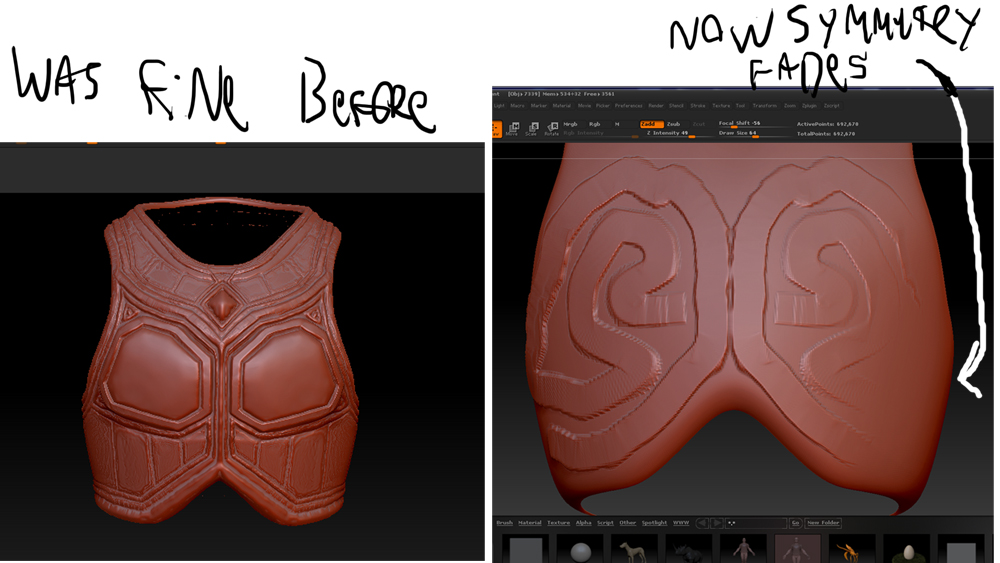
I have recently learned a lot of “what not to do” in zbrush, and this has lead me to restart my current sculpt attempt from scratch. The model IS perfectly symmetrical, as my first attempt at sculpting did not give me this issue. I have included a picture showing my first sculpting attempt, and the new base mesh that is fading when I sculpt on it.
Attachments
 >M< off. So rather than mirroring across the axis of symmetry, ZBrush is performing the operation in the same direction. What goes up on one side goes down on the opposite side.